Step 26 of 29
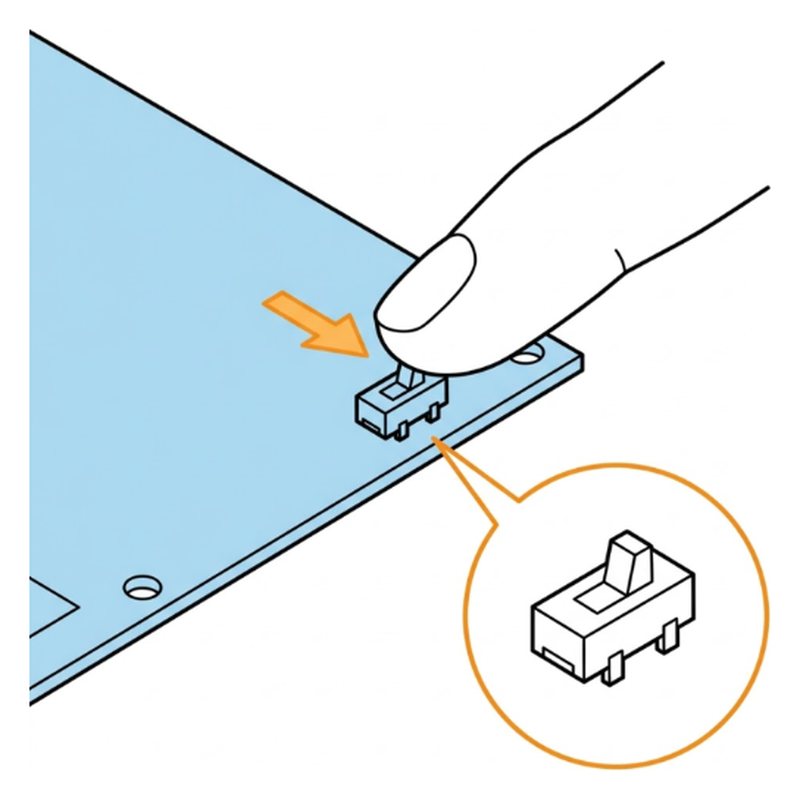
Switch to camera mode
On the expansion board, slide the small switch from upload to cam.
Check: Switch is on cam.
Common mistake: Leaving it on upload. The app cannot connect.
Researched by Riley Hart · based on ELEGOO Smart Robot Car V4 build guide and docs · we may earn a commission
The board switch is on upload, or the phone left the car's Wi-Fi. Start with this: Slide the small switch on the expansion board to cam.
The board switch is on upload, or the phone left the car's Wi-Fi.
On the expansion board, slide the small switch from upload to cam.
Check: Switch is on cam.
Common mistake: Leaving it on upload. The app cannot connect.
Open step 26 in the free build tool, tap Stuck and take a photo. The coach checks it against that exact step and tells you what to change. 3 free questions per kit.
Drawings by robotsforthat. ELEGOO Smart Robot Car V4 is a trademark of ELEGOO. We are not affiliated with ELEGOO.