Skip to content
Live
Updated 2026-10-27

How to build the ELEGOO Smart Robot Car V4, step by step

Researched by Riley Hart · based on ELEGOO Smart Robot Car V4 build guide and docs · we may earn a commission

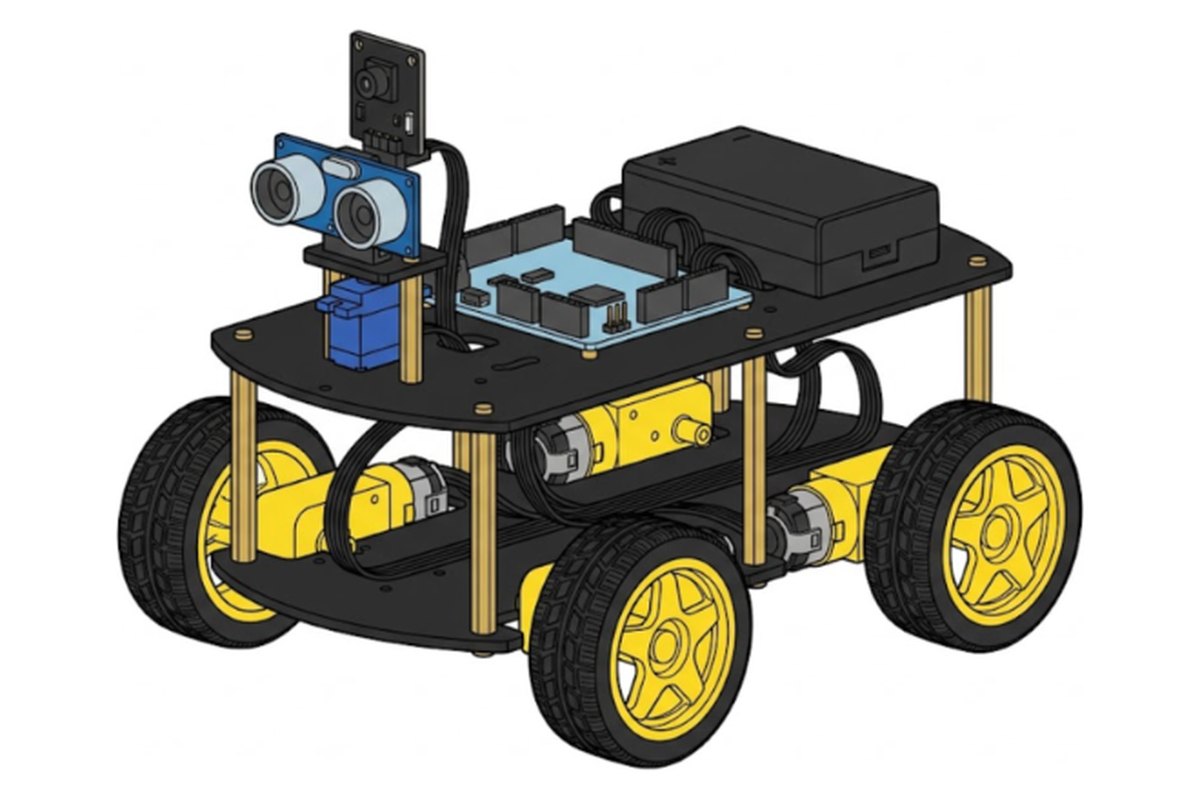
The ELEGOO Smart Robot Car V4.0 is a four wheel camera car you drive from your phone. This guide breaks the build into small steps, each with its own drawing, the exact screws and the mistake most people make on that step.

Short answer

Plan for 2 to 3 hours. Build the motors, add the line sensor, mount the boards and battery, build the camera and eye tower, wire it up, close the frame and add the wheels. No soldering and no coding.

Kit priceAbout $66 to $80
Build time2 to 3 hours
Steps29
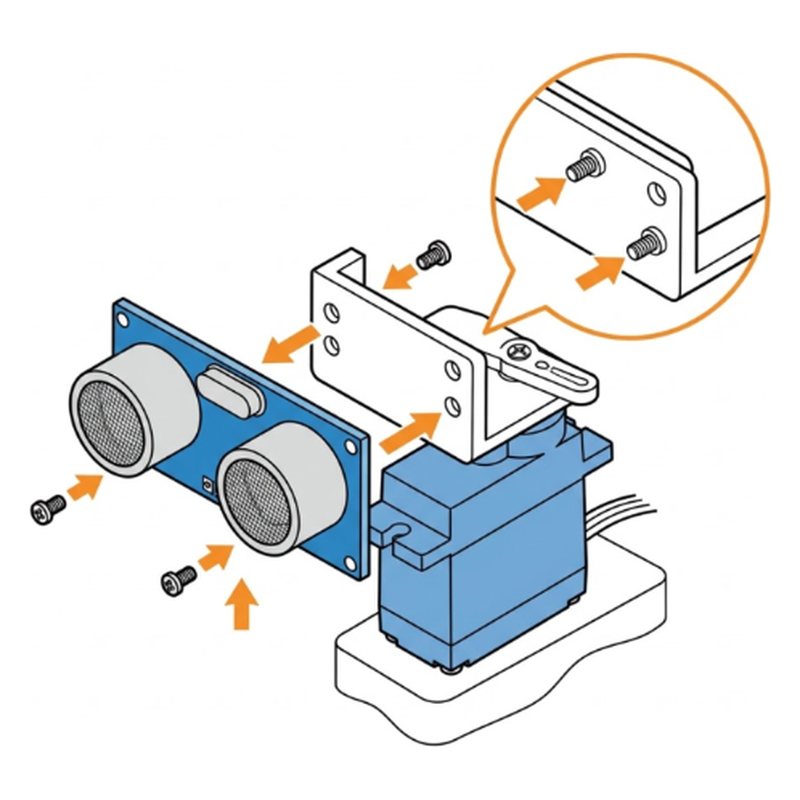
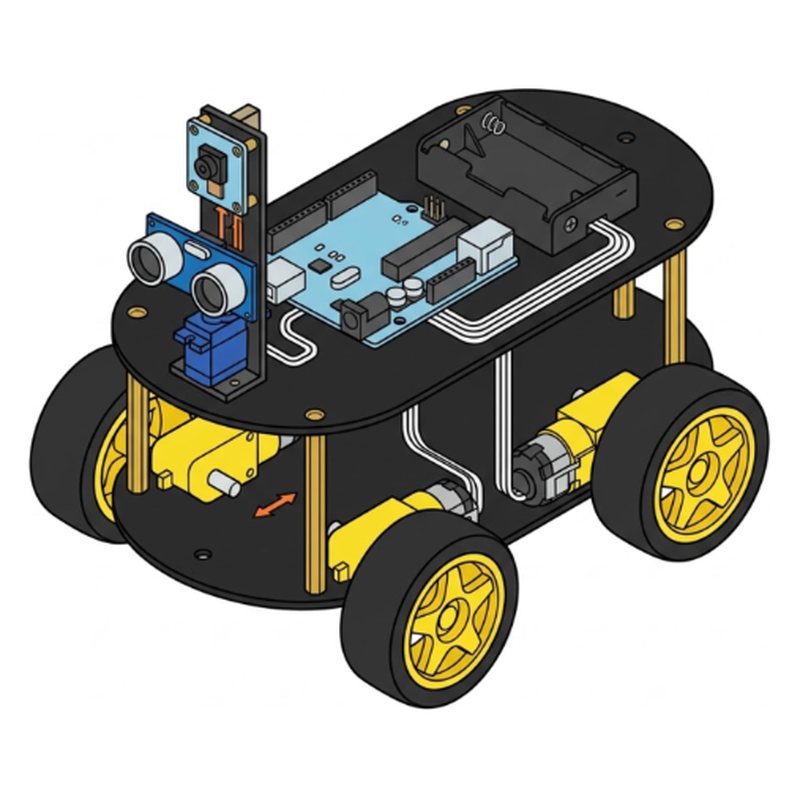
The finished ELEGOO Smart Robot Car V4 robot car
What you will build
Free build tool

Build it with a check after every step

Same 29 steps on your phone, one at a time. Tick what you should see, and if something looks off, the AI coach checks a photo of your build.

Start building →

Part 1: Get ready

ELEGOO Smart Robot Car V4 step 1: Sort the parts by bag
Step 1 of 29

Sort the parts by bag

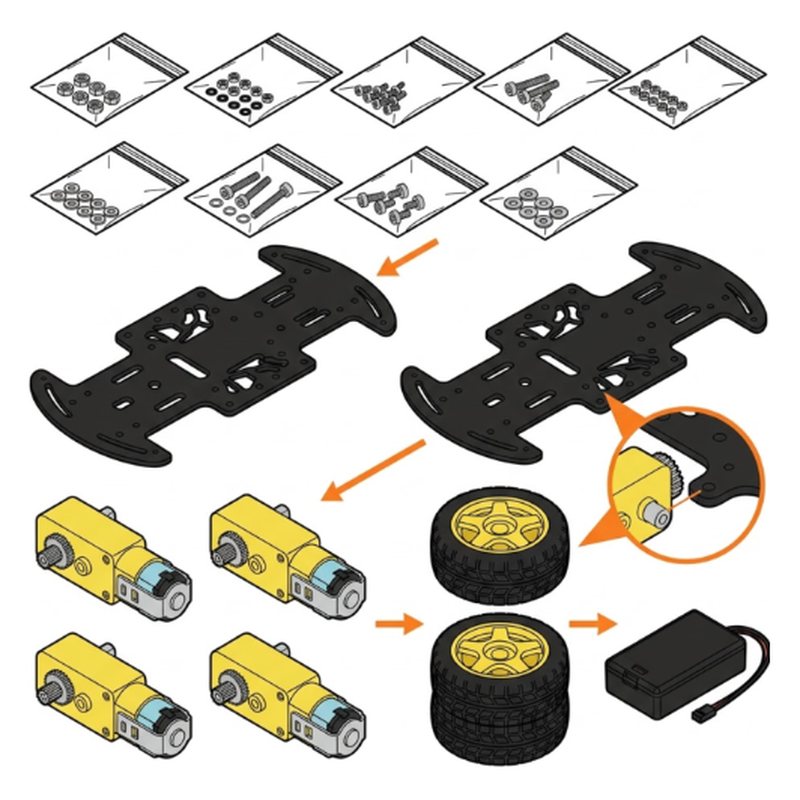
Open the box on a big table. Keep each small bag closed for now. Every bag has a label like FOR MOTOR or FOR CAMERA, and each step tells you which bag to open.

Tip: Start charging the battery box now with the USB cable. It needs about 2 hours.

Check: Bags laid out, still closed.

Common mistake: Pouring every bag into one pile. The screws look alike and are hard to sort later.
ELEGOO Smart Robot Car V4 step 2: Peel the film off both plates
Step 2 of 29

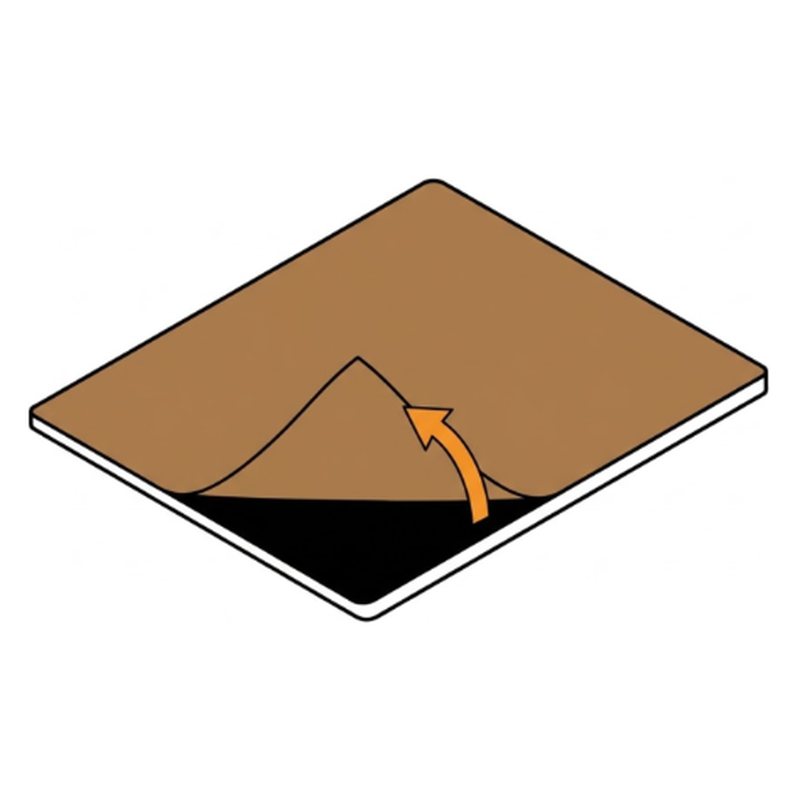
Peel the film off both plates

The two black plates have a thin protective film on each side. Peel it all off before you build.

Bottom plateTop plate

Check: Both plates are shiny black, no film left.

Common mistake: Leaving the film on. It traps screws and looks cloudy later.

Part 2: Motors

ELEGOO Smart Robot Car V4 step 3: Fix a block to each motor
Step 3 of 29

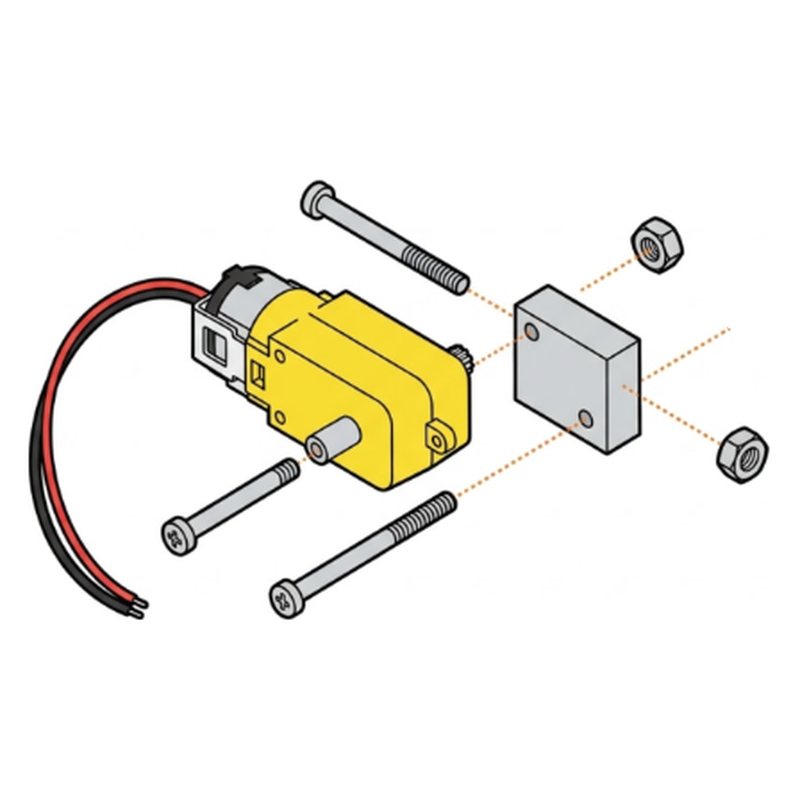
Fix a block to each motor

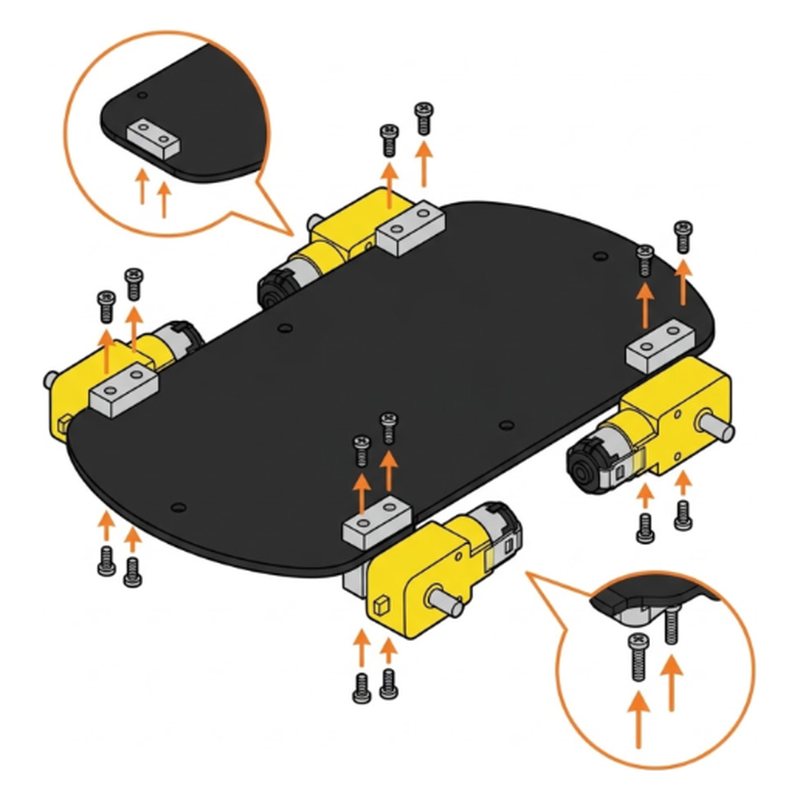
Open the bag FOR MOTOR. Put a small aluminium block against a motor and push two M3x30 screws through the motor and the block. Add an M3 nut on each. Do all four motors.

4 motors4 aluminium blocks8 M3x30 screws8 M3 nuts

Check: 4 motors, each with a silver block.

Common mistake: Using short screws. These are the long M3x30 ones.

ELEGOO Smart Robot Car V4 step 4: Screw the motors onto the bottom plate
Step 4 of 29

Screw the motors onto the bottom plate

Put the bottom plate flat. Fix each motor's block to a corner of the plate with two M3x10 screws from below. Point the motor shafts outward and the wires toward the middle.

Bottom plate8 M3x10 screws

Check: 4 motors under the plate corners. All shafts point outward.

Common mistake: Pointing a shaft inward. The wheel will not fit.

Part 3: Line sensor

ELEGOO Smart Robot Car V4 step 5: Mount the line sensor under the front
Step 5 of 29

Mount the line sensor under the front

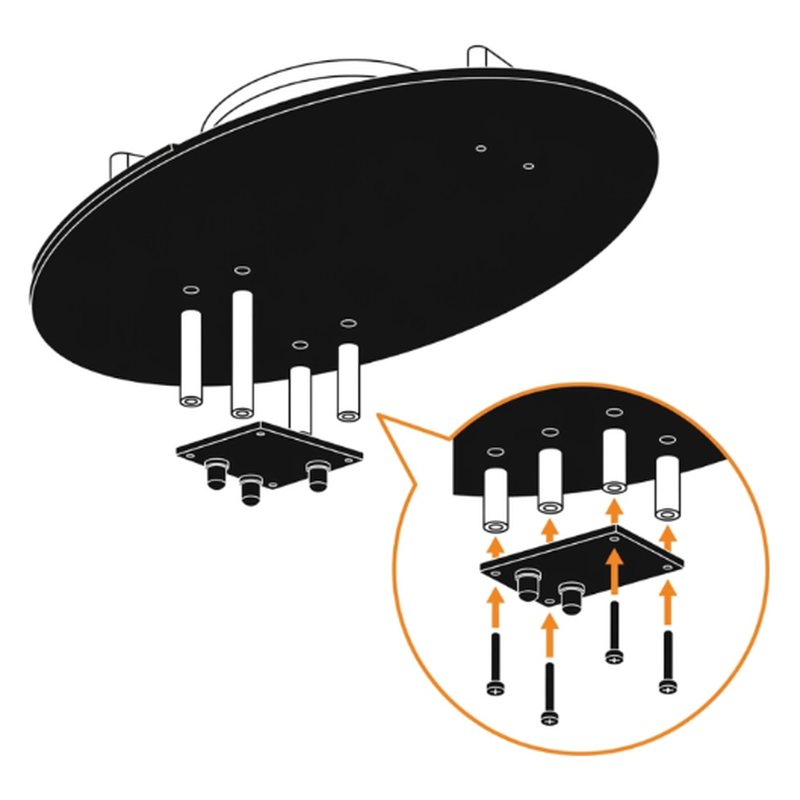
Open the bag FOR UNO, LINE TRACKING. Put four white spacer pillars between the plate and the black line tracking board, under the front of the bottom plate. Fix with four M3x14 screws and four M3 nuts. The three sensors face the floor.

Line tracking board4 white spacer pillars4 M3x14 screws4 M3 nuts

Check: Sensor board under the front, sensors facing down.

Common mistake: Mounting it on top of the plate. It has to see the floor.

Part 4: Brain and battery

ELEGOO Smart Robot Car V4 step 6: Add the motion sensor to the board
Step 6 of 29

Add the motion sensor to the board

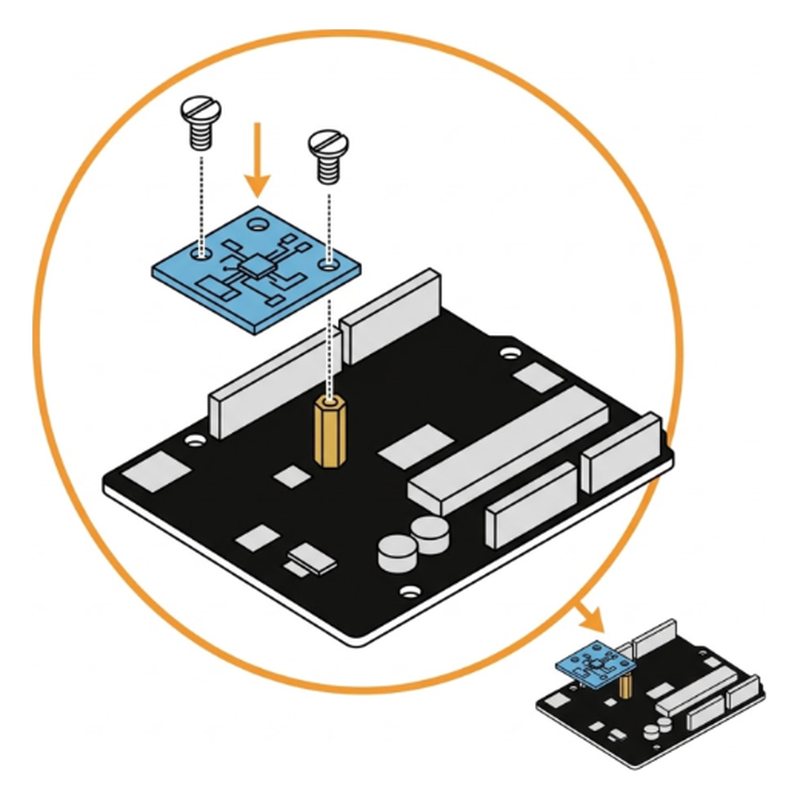
Open the bag FOR CELL BOX, TIRES, GY-521. Fix the small blue GY-521 sensor onto the expansion board with the M3x11 copper pillar and two M3x5 flat head screws.

GY-521 sensorExpansion board1 M3x11 copper pillar2 M3x5 screws

Check: Small blue board standing on a gold pillar.

Common mistake: Overtightening. The small board cracks easily.

ELEGOO Smart Robot Car V4 step 7: Fix the UNO board to the top plate
Step 7 of 29

Fix the UNO board to the top plate

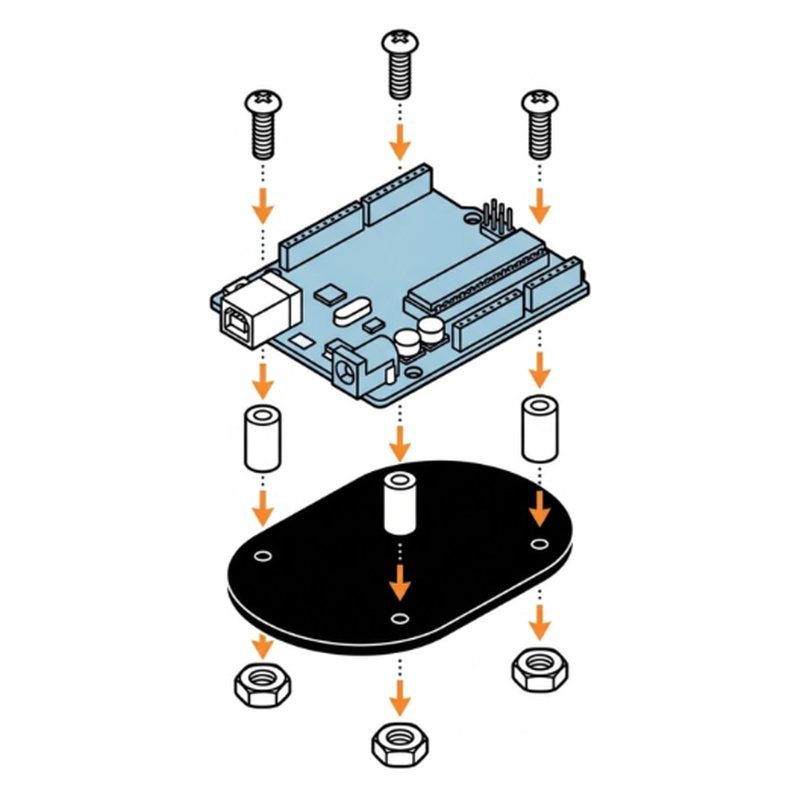
Fix the UNO board on the top plate with three white spacer pillars, three M3x14 screws and three M3 nuts.

UNO boardTop plate3 white spacer pillars3 M3x14 screws3 M3 nuts

Check: UNO board flat on its spacers.

Common mistake: Skipping the white spacers. Metal parts under the board can cause a short.

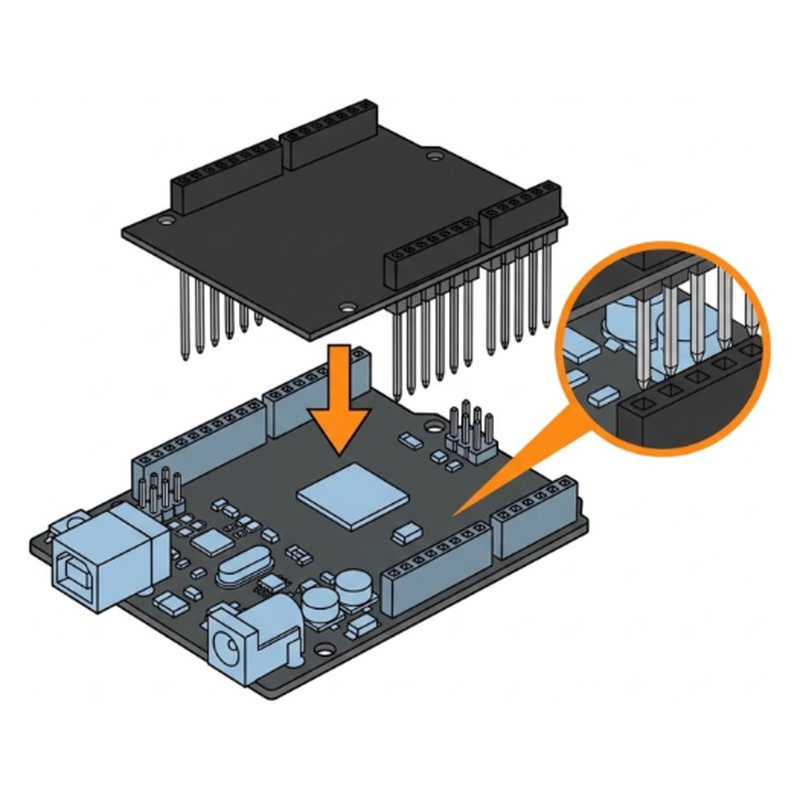
ELEGOO Smart Robot Car V4 step 8: Press the expansion board on top
Step 8 of 29

Press the expansion board on top

Line up every pin of the expansion board with the UNO sockets and press it straight down.

Expansion board

Tip: Look along the side before pressing.

Check: No pins showing outside the sockets.

Common mistake: Pressing at an angle. One bent pin stops the car working.

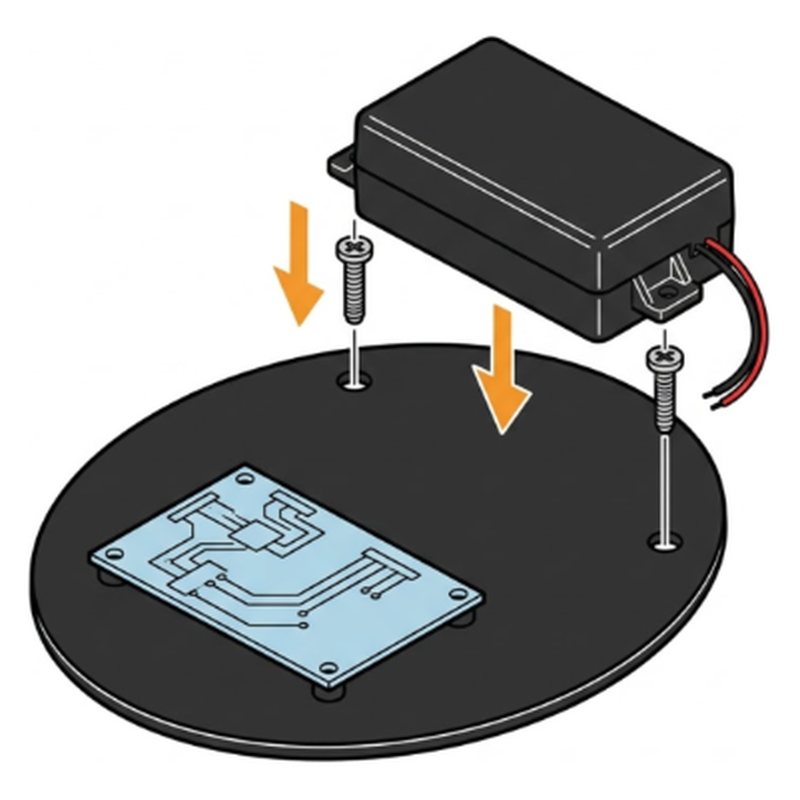
ELEGOO Smart Robot Car V4 step 9: Fix the battery box
Step 9 of 29

Fix the battery box

Fix the black battery box on the top plate behind the boards with two M3x12 screws and two M3 nuts.

Battery box2 M3x12 screws2 M3 nuts

Check: Battery box held firm at the back.

Common mistake: Putting the box over the board. Its power switch must stay easy to reach.

ELEGOO Smart Robot Car Kit V4.0About $66 to $80. Every part and tool in one box.
Check price on Amazon

Part 5: Camera and eyes

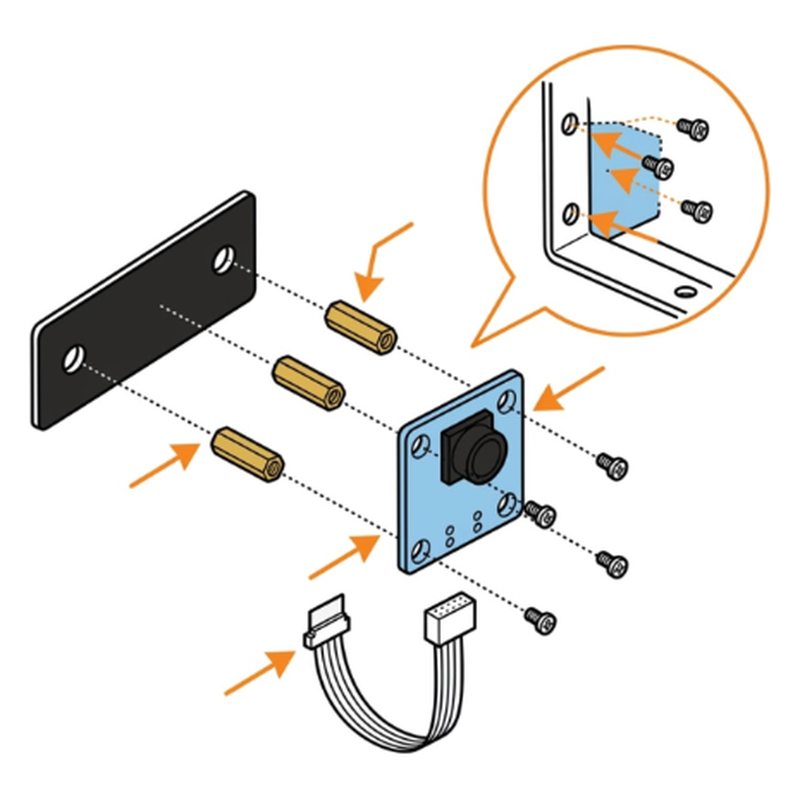
ELEGOO Smart Robot Car V4 step 10: Fix the camera to its bracket
Step 10 of 29

Fix the camera to its bracket

Open the bag FOR CAMERA. Screw two M2x6 copper pillars to the black camera bracket with M2x4 screws, then fix the camera board on the pillars with two more M2x4 screws. Plug in one 4 wire cable.

Camera boardCamera bracket2 M2x6 copper pillars4 M2x4 screws4 wire cable

Check: Camera board on the bracket, lens facing out. 4 wire cable plugged in.

Common mistake: Mounting the camera upside down. The lens goes at the top.

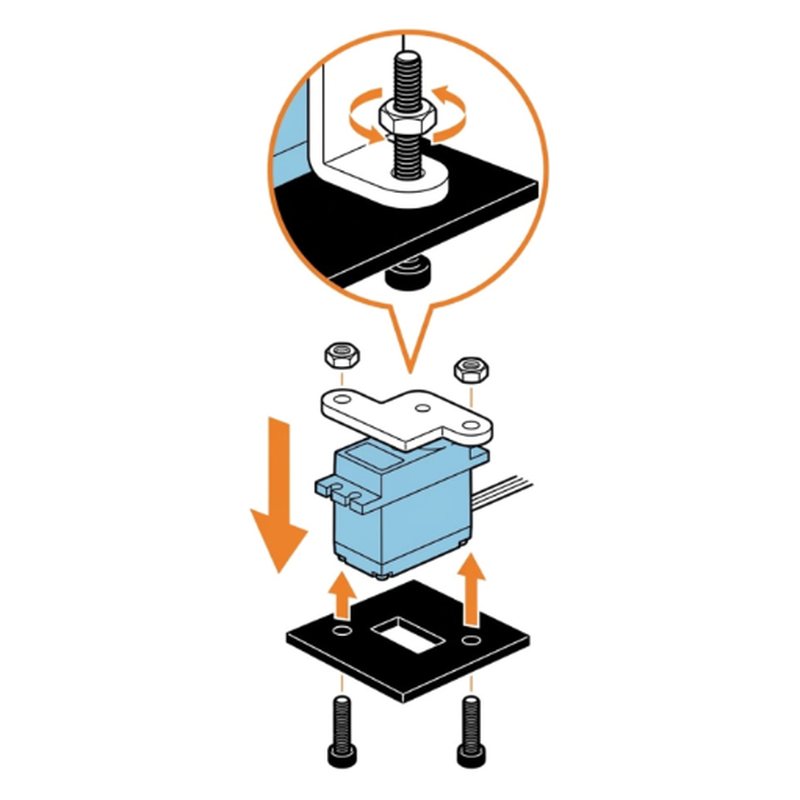
ELEGOO Smart Robot Car V4 step 11: Fix the servo to the small plate
Step 11 of 29

Fix the servo to the small plate

Open the bag FOR ULTRASONIC. Put the blue servo with its white holder through the small black plate. Fix it with two M2x10 screws and two M2 nuts.

Servo with white holderSmall black plate2 M2x10 screws2 M2 nuts

Check: Servo held under the holder plate.

Common mistake: Twisting the servo arm by hand. It sets the eyes straight later.

ELEGOO Smart Robot Car V4 step 12: Fix the ultrasonic eyes
Step 12 of 29

Fix the ultrasonic eyes

Fix the blue ultrasonic sensor (the part with two round eyes) to the front of the white holder with two M1.6x8 screws and two M1.6 nuts.

Ultrasonic sensor2 M1.6x8 screws2 M1.6 nuts

Check: Two eyes facing forward.

Common mistake: Using the long M1.6x16 screws. Those are for the next step.

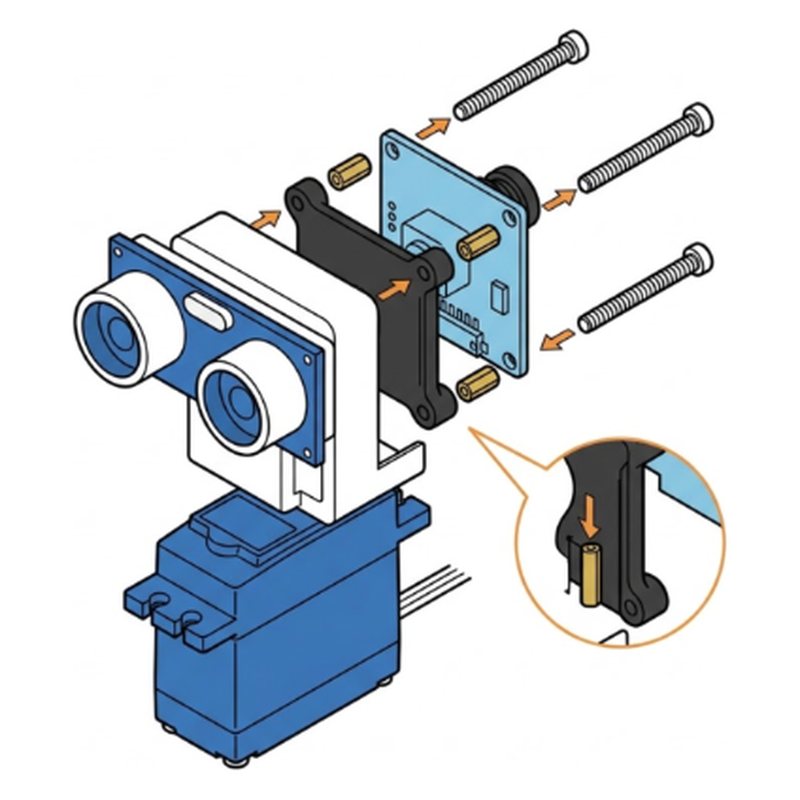
ELEGOO Smart Robot Car V4 step 13: Add the camera behind the eyes
Step 13 of 29

Add the camera behind the eyes

Fix the camera bracket to the back of the white holder with two M2x6 copper pillars, two M1.6x16 screws and two M1.6 nuts.

2 M2x6 copper pillars2 M1.6x16 screws2 M1.6 nuts

Check: Camera stands above the eyes, both face forward.

Common mistake: Facing the camera backward. Lens and eyes must look the same way.

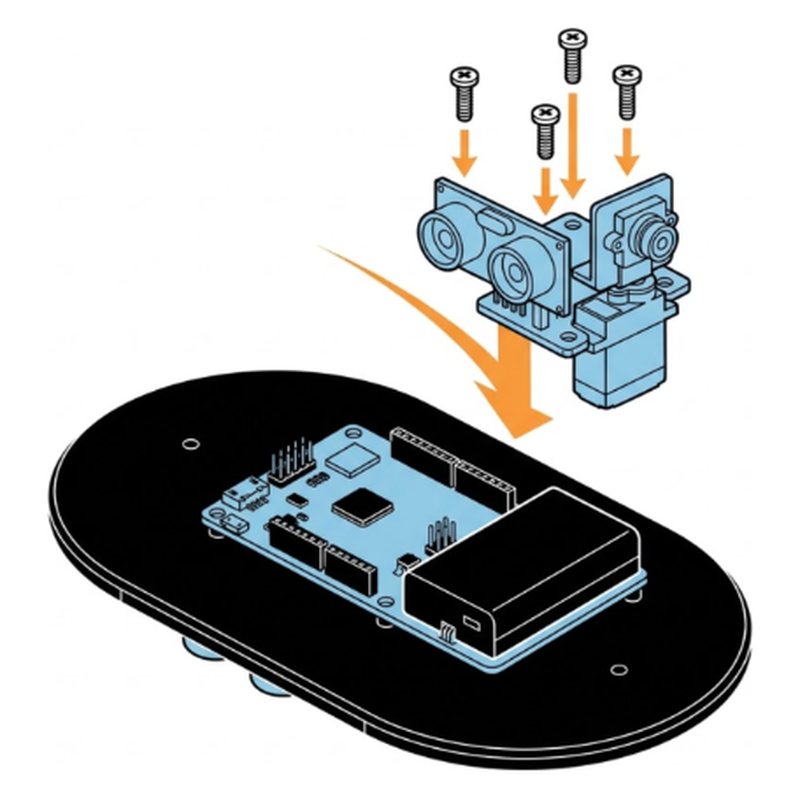
ELEGOO Smart Robot Car V4 step 14: Mount the sensor tower at the front
Step 14 of 29

Mount the sensor tower at the front

Fix the whole tower to the front of the top plate with three M3x10 screws and three M3 nuts.

3 M3x10 screws3 M3 nuts

Check: Tower stands straight at the front.

Common mistake: Mounting it at the back. The eyes go over the narrow front.

Part 6: Wiring and frame

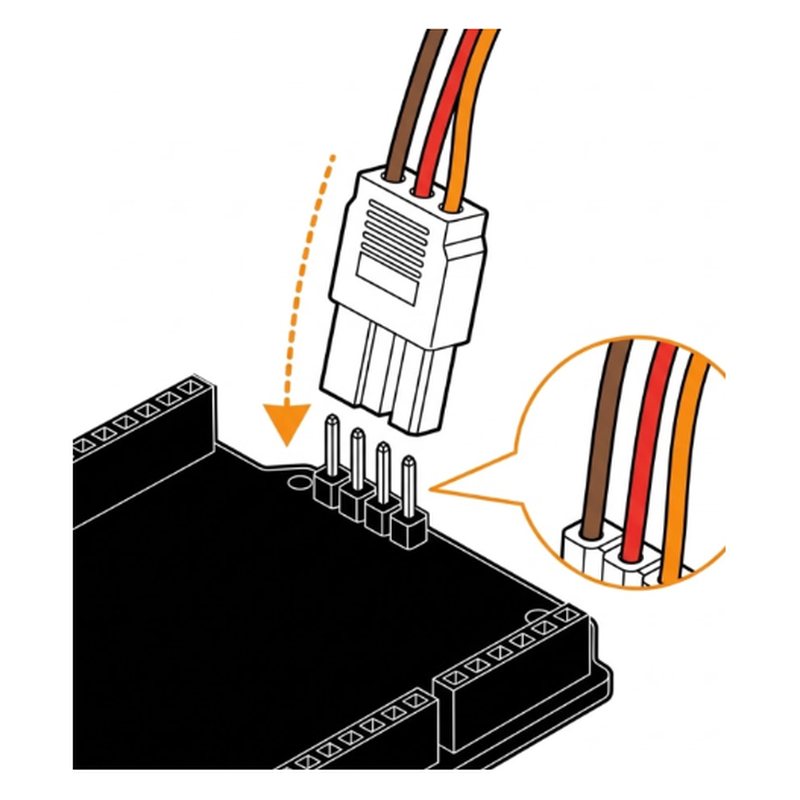
ELEGOO Smart Robot Car V4 step 15: Plug in the servo
Step 15 of 29

Plug in the servo

Plug the servo's 3 wire plug into the port marked Servo1 on the expansion board. Brown wire to GND.

Servo cable

Check: Servo plug in Servo1. Brown wire on GND.

Common mistake: Plugging it in backwards. Check the wire colors match the pin labels.

ELEGOO Smart Robot Car V4 step 16: Plug in the eyes and the camera
Step 16 of 29

Plug in the eyes and the camera

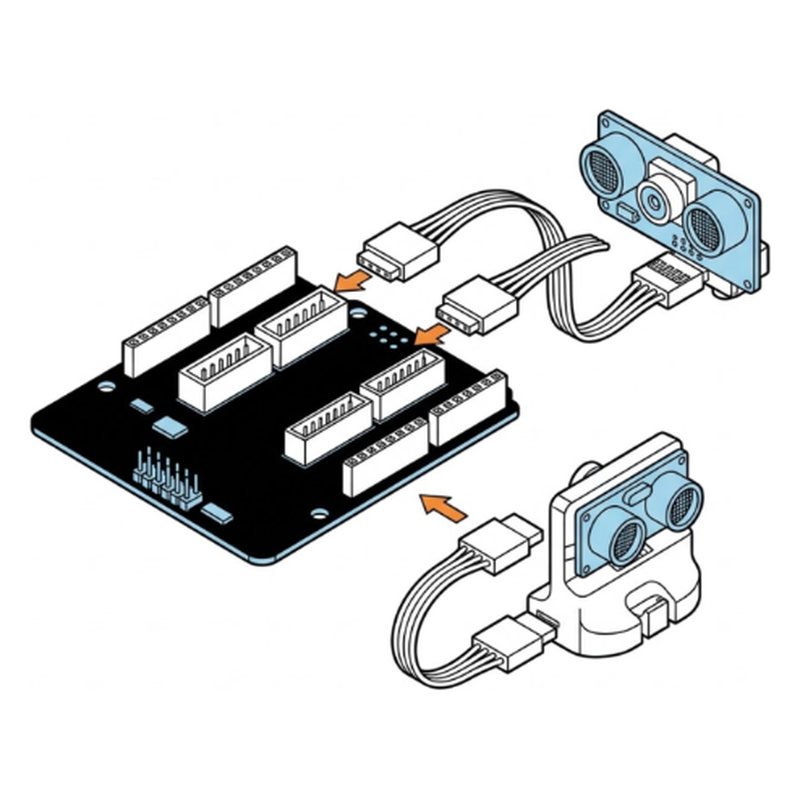
Connect the ultrasonic sensor to its port with a 4 wire cable, then plug the camera cable into the camera port.

4 wire cable

Check: Both 4 wire cables clicked in.

Common mistake: Swapping the two plugs. Check the port labels on the board.

ELEGOO Smart Robot Car V4 step 17: Add the six tall posts
Step 17 of 29

Add the six tall posts

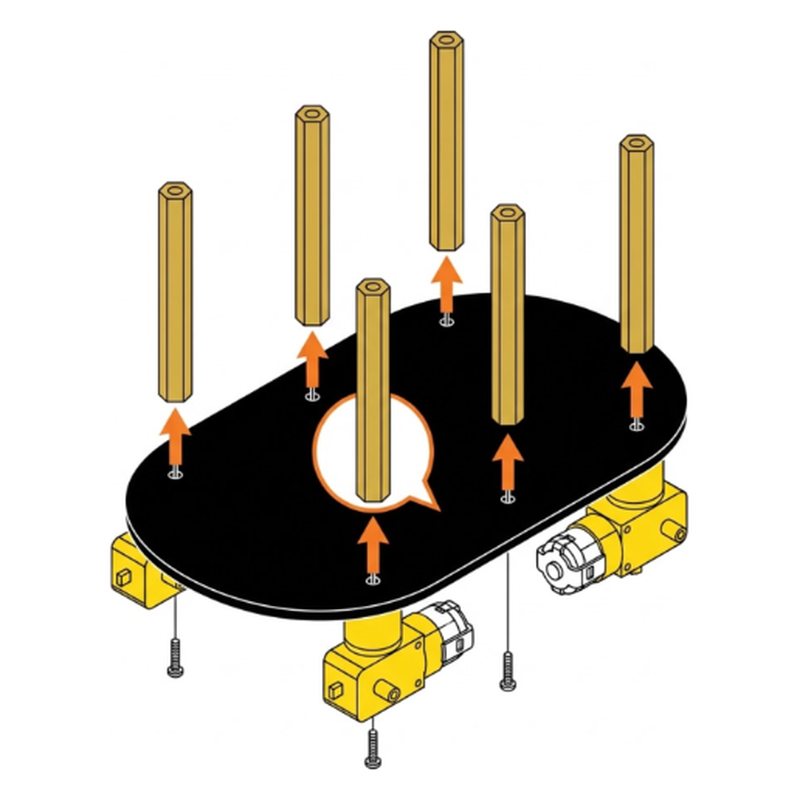
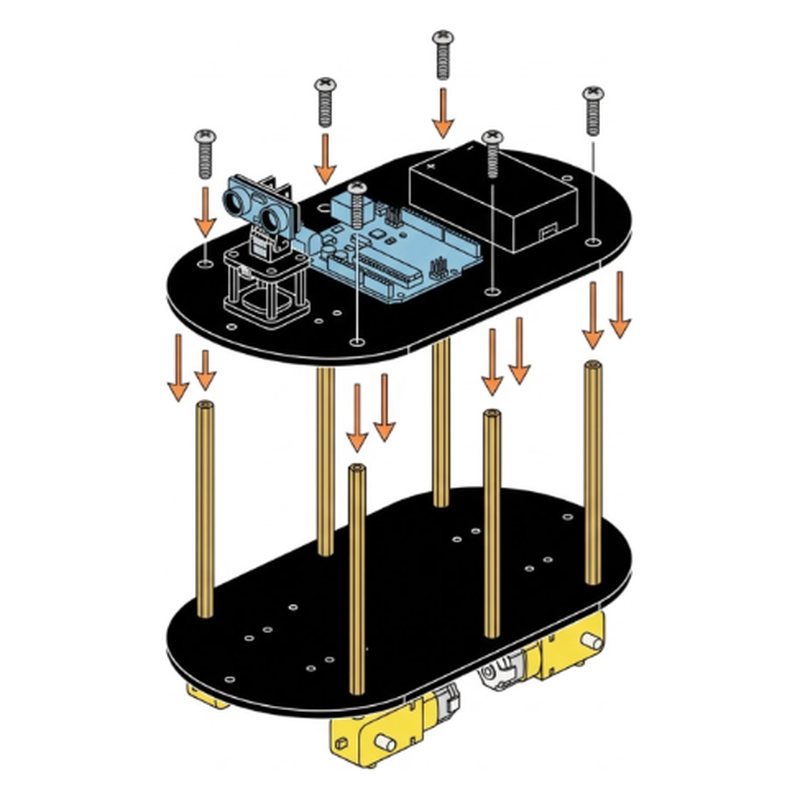
Open the bag FOR ACRYLIC BASEPLATE. Screw six tall M3x40 gold pillars onto the bottom plate with six M3x10 screws from below.

6 M3x40 gold pillars6 M3x10 screws

Check: Six posts standing straight.

Common mistake: Mixing up pillar sizes. These are the tallest gold ones.

ELEGOO Smart Robot Car V4 step 18: Plug in the four motors
Step 18 of 29

Plug in the four motors

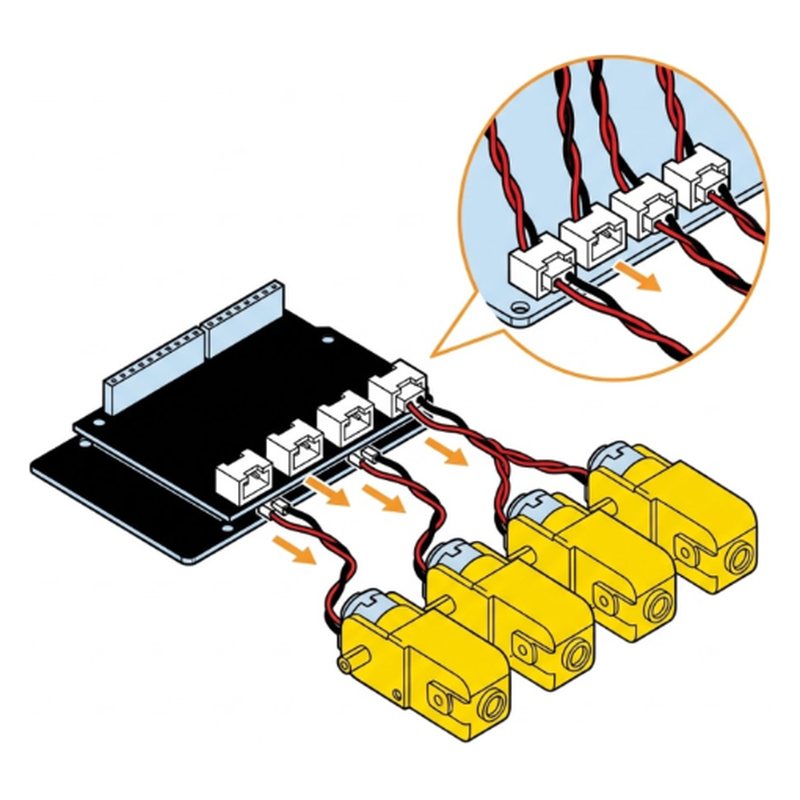
Plug each motor into its port: left front M1, right front M2, right rear M3, left rear M4.

Motor cables

Tip: Front means the end with the eyes.

Check: All 4 motor plugs in the right ports.

Common mistake: Plugging a motor into the wrong port. The car spins or drives backward.

ELEGOO Smart Robot Car V4 step 19: Plug in the line sensor
Step 19 of 29

Plug in the line sensor

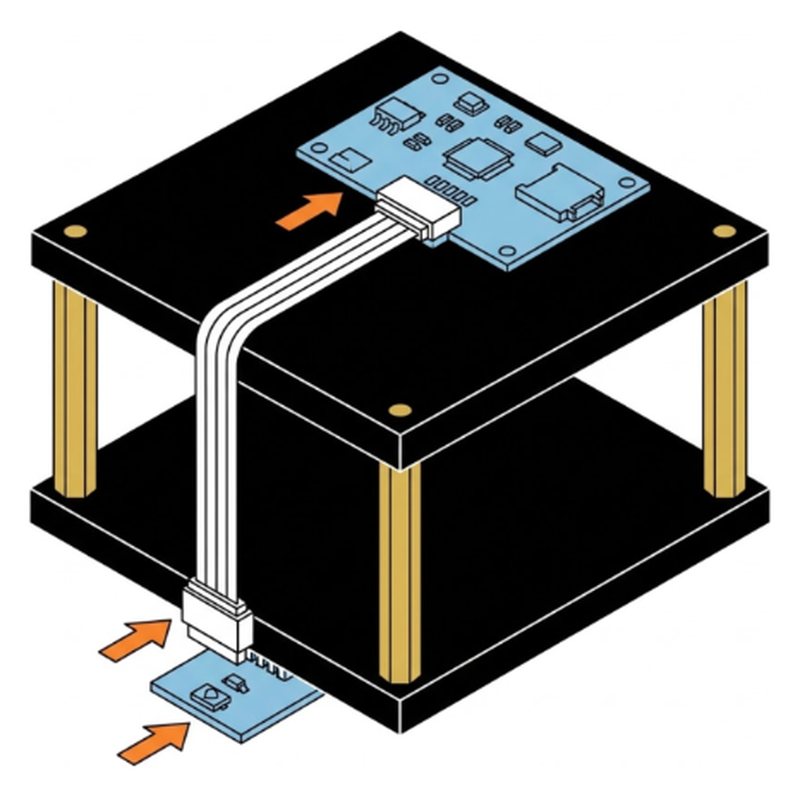
Connect the line tracking board under the car to its port with the 5 wire cable.

5 wire cable

Check: 5 wire cable clicked in at both ends.

Common mistake: Letting the cable hang low. It will drag on the floor.

ELEGOO Smart Robot Car V4 step 20: Close the car
Step 20 of 29

Close the car

Place the top plate on the six posts and fix it with six M3x10 screws.

6 M3x10 screws

Check: Top plate firm on all six posts. No wire pinched between plates.

Common mistake: Trapping a wire between the posts and the plate.

Part 7: Wheels

ELEGOO Smart Robot Car V4 step 21: Put on the four wheels
Step 21 of 29

Put on the four wheels

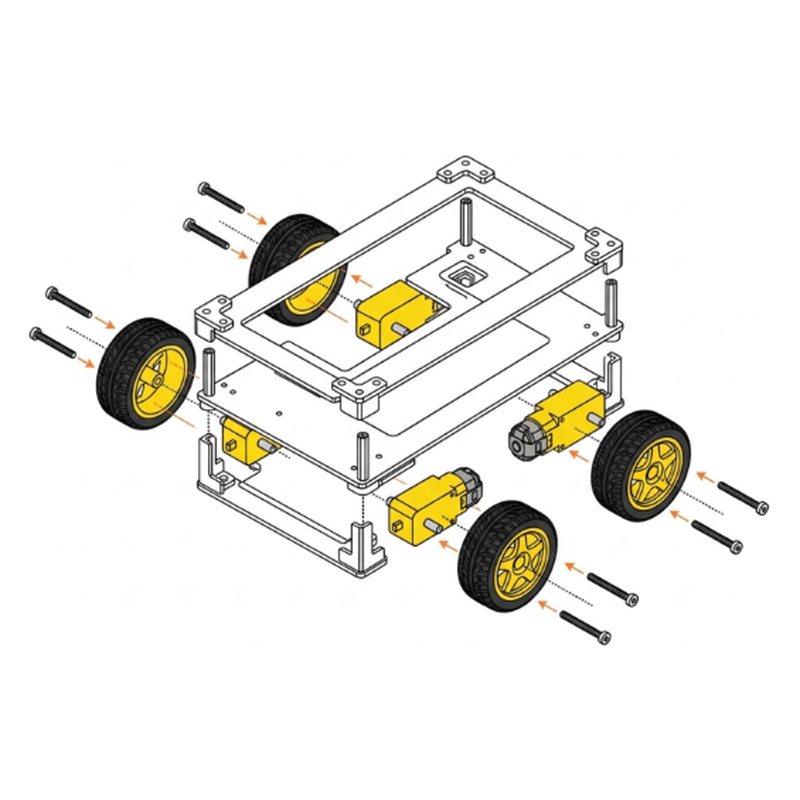
Push a wheel onto each motor shaft, then fix it with an M2x25 self tapping screw through the center.

4 tires4 M2x25 screws

Check: 4 wheels on, each spins freely.

Common mistake: Forcing the wheel at an angle. Line up the flat side of the shaft first.

Part 8: Drive it

ELEGOO Smart Robot Car V4 step 22: Check every plug
Step 22 of 29

Check every plug

Compare your car with the finished car. Every cable plugged in, nothing touching the wheels.

Check: No loose cables. Wheels spin without touching wires.

Common mistake: Skipping this check. A loose plug is the top reason a part does not work.

ELEGOO Smart Robot Car V4 step 23: Switch it on
Step 23 of 29

Switch it on

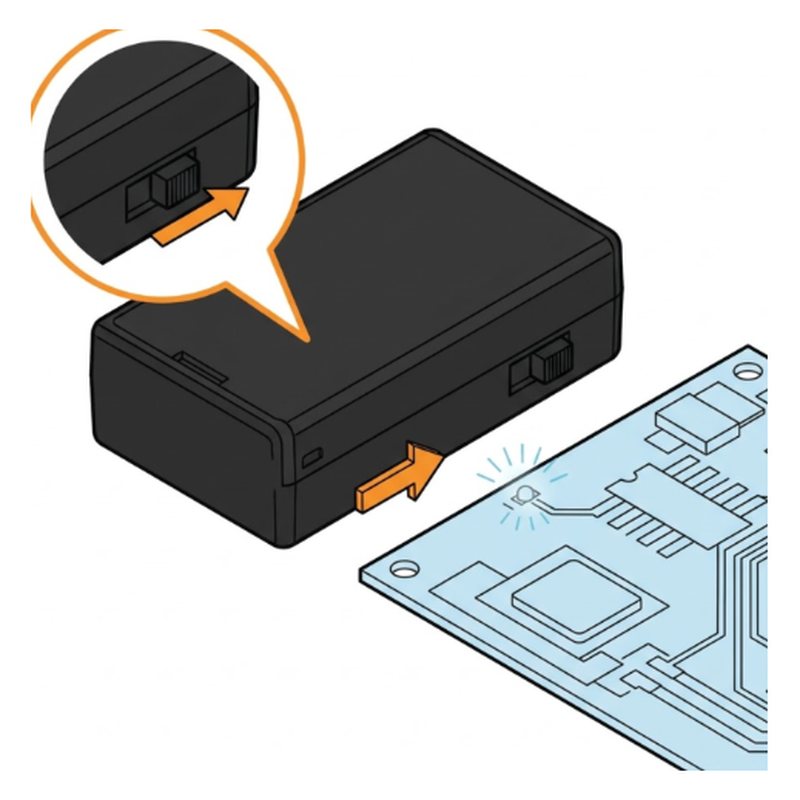
Slide the power switch on the battery box to ON. The status light on the board comes on.

Check: Status light is on.

Common mistake: Battery not charged. A red light means it is low.

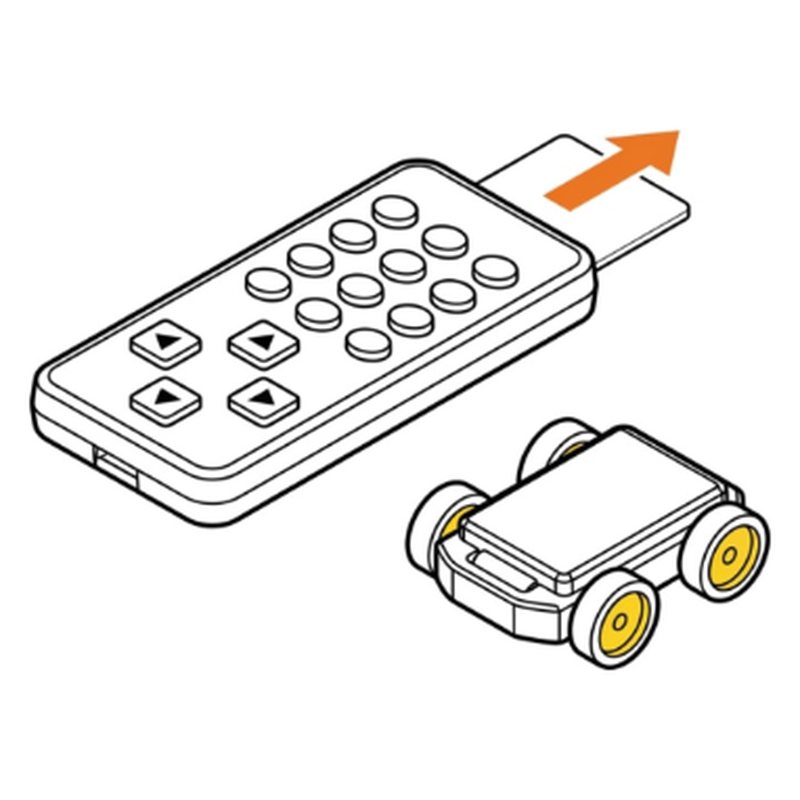
ELEGOO Smart Robot Car V4 step 24: Drive with the remote
Step 24 of 29

Drive with the remote

Pull the plastic tab out of the remote. Use the arrows to drive. Press 1 for line following, 2 for obstacle avoiding, 3 for follow me.

Remote control

Check: The car drives with the arrows.

Common mistake: Leaving the plastic tab in the remote. Nothing happens.

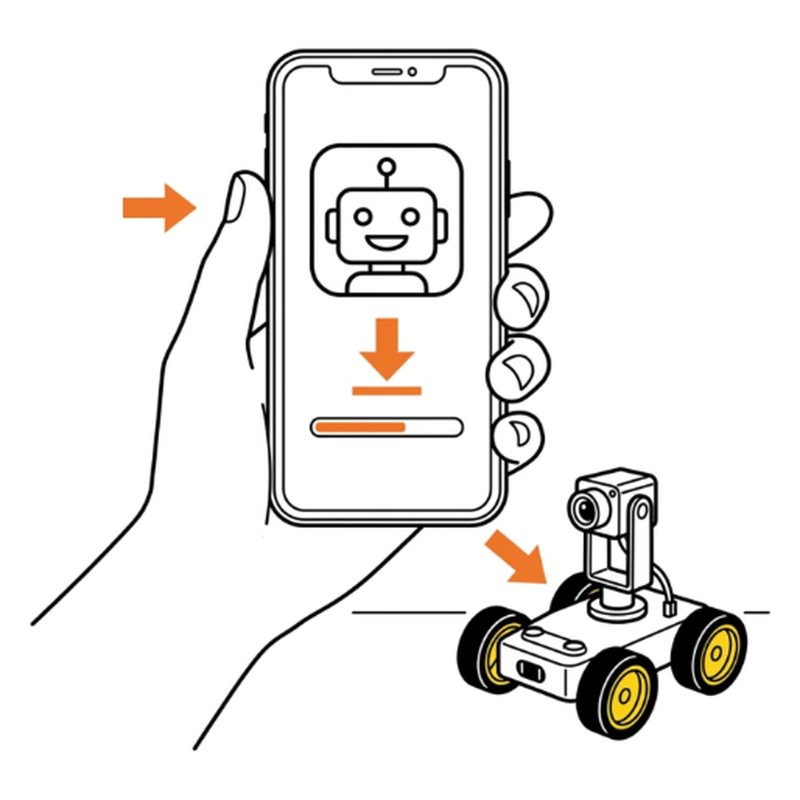
ELEGOO Smart Robot Car V4 step 25: Get the app
Step 25 of 29

Get the app

On your phone, install the EleRobot app from the App Store or Google Play.

Check: EleRobot app installed.

Common mistake: Installing an old Elegoo app. Look for EleRobot.

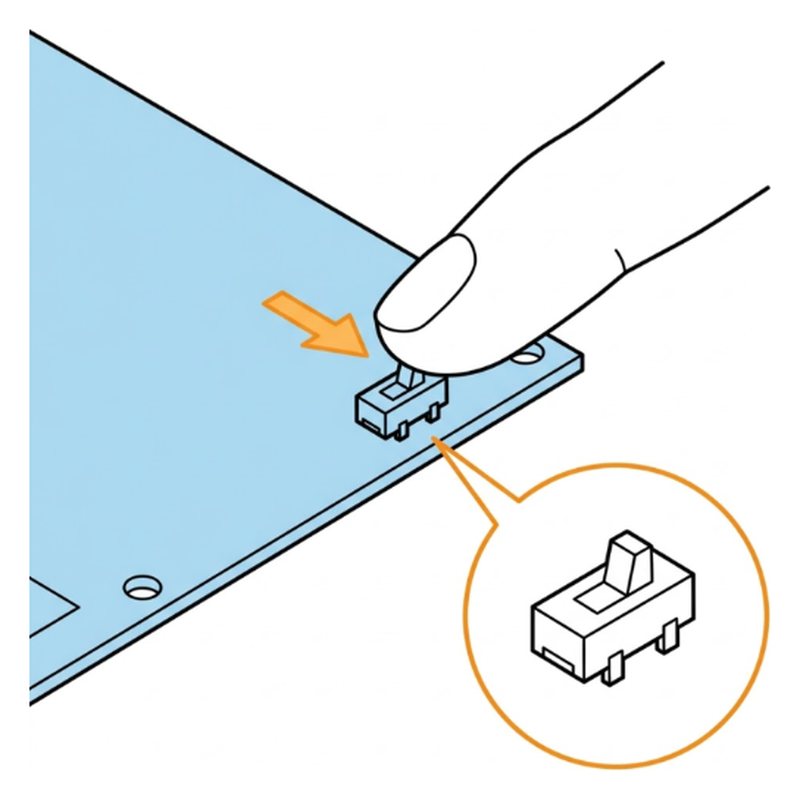
ELEGOO Smart Robot Car V4 step 26: Switch to camera mode
Step 26 of 29

Switch to camera mode

On the expansion board, slide the small switch from upload to cam.

Check: Switch is on cam.

Common mistake: Leaving it on upload. The app cannot connect.

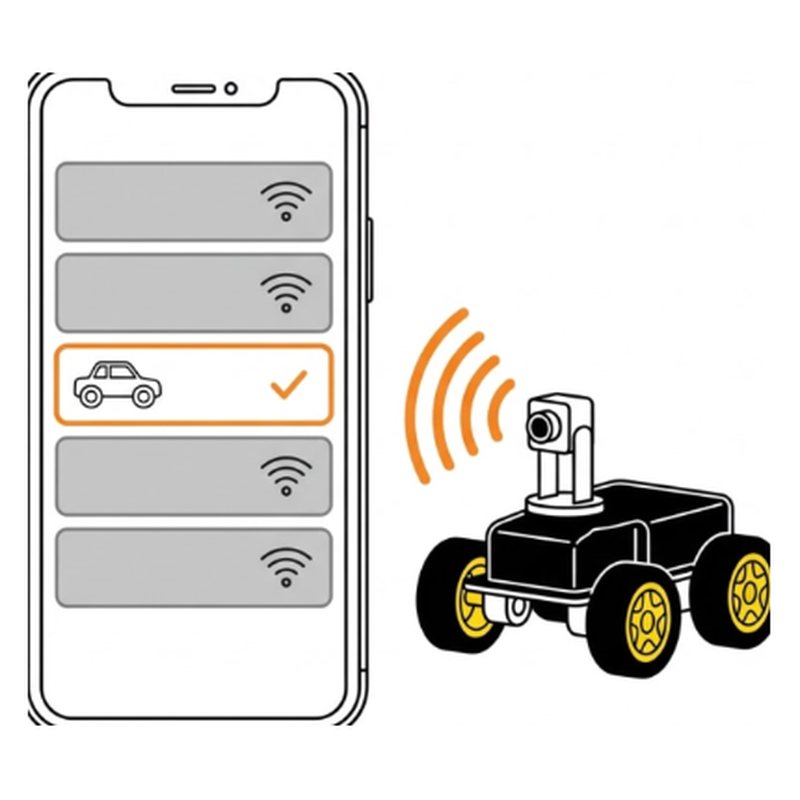
ELEGOO Smart Robot Car V4 step 27: Join the car's Wi-Fi
Step 27 of 29

Join the car's Wi-Fi

In your phone's Wi-Fi settings, join the network named ELEGOO followed by numbers. When the phone says No internet, stay connected.

Check: Phone shows ELEGOO Wi-Fi connected.

Common mistake: Letting the phone switch back to home Wi-Fi.

ELEGOO Smart Robot Car V4 step 28: Drive from your phone
Step 28 of 29

Drive from your phone

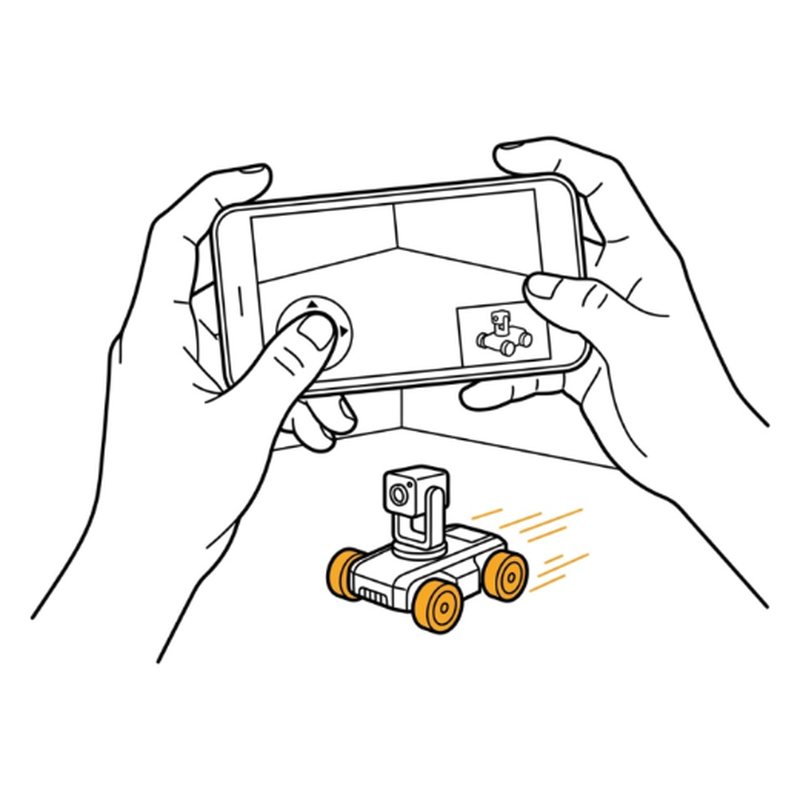
Open EleRobot, pick Smart Robot Car, tap Remote Control and OK. Use the round joystick, then try FPV mode to drive using the camera view.

Check: The car moves with the joystick. You can see the camera view.

Common mistake: Pushing the joystick all the way. Start with small pushes.

ELEGOO Smart Robot Car V4 step 29: Let it drive itself
Step 29 of 29

Let it drive itself

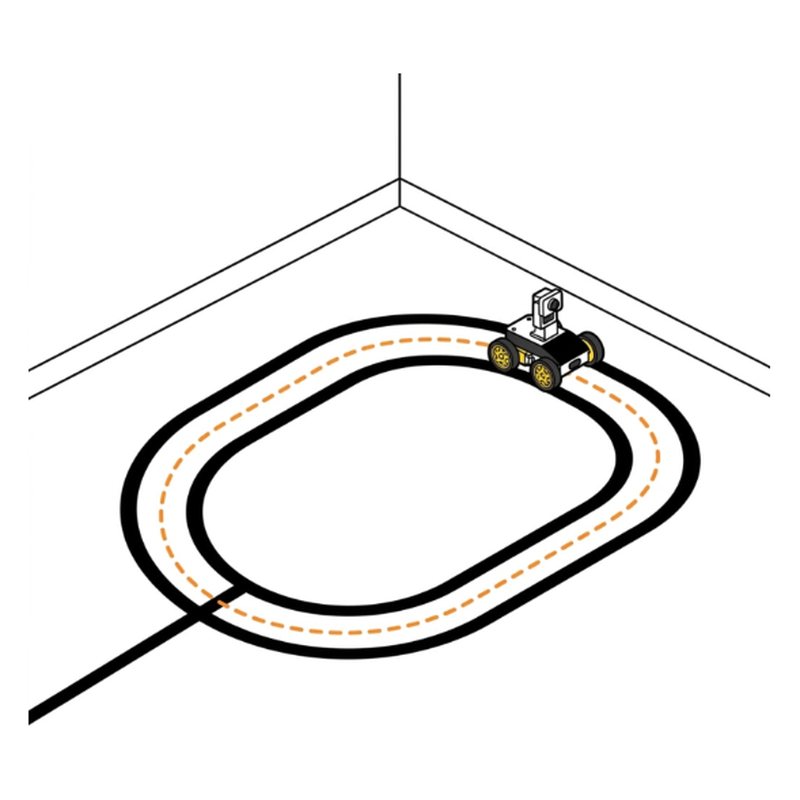
In the app, try Obstacle Avoidance: put it on the floor and watch it turn away from walls. Then try Line Tracking on a black tape line.

Tip: If it misses the line, use keys 4, 5 and 6 on the remote to tune the sensor.

Check: It turns away from walls on its own.

Common mistake: Testing line tracking on a dark floor. Use black tape on a light floor.

Free build tool

Build it with a check after every step

Same 29 steps on your phone, one at a time. Tick what you should see, and if something looks off, the AI coach checks a photo of your build.

Start building →

After the build

Line race

Make a loop with black tape on a light floor and time one lap in line tracking mode.

Spy drive

Drive into another room using only the camera view.

Follow me

Press 3 and walk slowly. The car follows your hand.

See projects you can build next with the same box.

More robot kit guides

Sources

Drawings by robotsforthat. ELEGOO Smart Robot Car V4 is a trademark of ELEGOO. We are not affiliated with ELEGOO.