Skip to content
Live
Updated 2026-10-27

ELEGOO Smart Robot Car V4: it misses the line

Researched by Riley Hart · based on ELEGOO Smart Robot Car V4 build guide and docs · we may earn a commission

Short answer

The line sensor needs contrast and the right threshold. Start with this: Use black tape on a light floor.

Why it happens

The line sensor needs contrast and the right threshold.

How to fix it

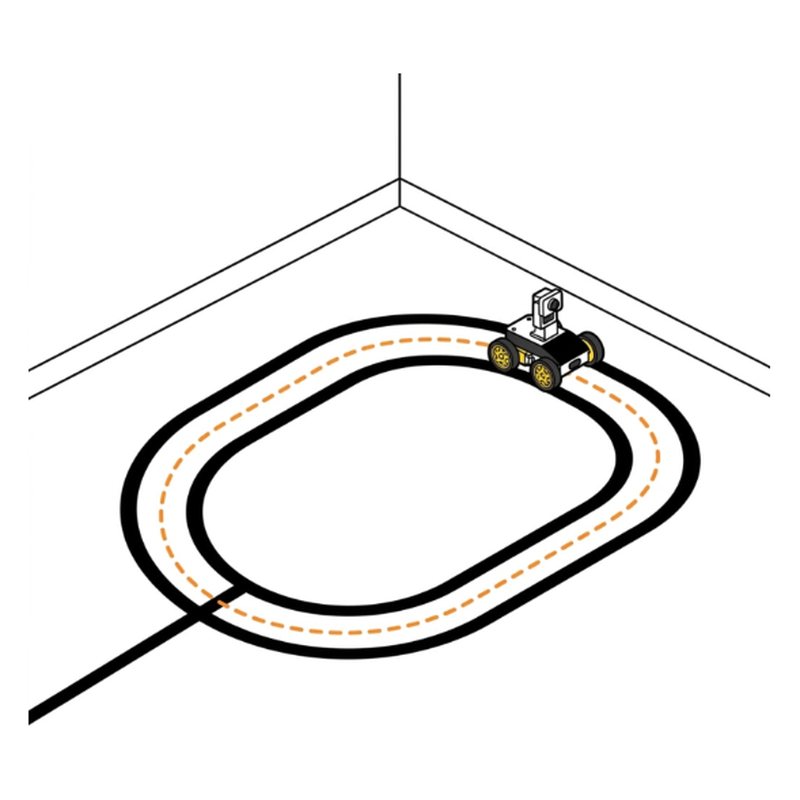
  1. Use black tape on a light floor.
  2. Press 4 or 6 on the remote to tune the sensor, 5 to reset.
  3. Check the 5 wire cable is in at both ends.

Check the step it comes from

ELEGOO Smart Robot Car V4 step 29: Let it drive itself
Step 29 of 29

Let it drive itself

In the app, try Obstacle Avoidance: put it on the floor and watch it turn away from walls. Then try Line Tracking on a black tape line.

Tip: If it misses the line, use keys 4, 5 and 6 on the remote to tune the sensor.

Check: It turns away from walls on its own.

Common mistake: Testing line tracking on a dark floor. Use black tape on a light floor.

See this step in the full build guide

Still stuck?

Show the AI coach a photo

Open step 29 in the free build tool, tap Stuck and take a photo. The coach checks it against that exact step and tells you what to change. 3 free questions per kit.

Open step 29 →

Other ELEGOO V4 problems

All 8 ELEGOO V4 problems and fixes · The full build guide

ELEGOO Smart Robot Car Kit V4.0About $66 to $80. Every part and tool in one box.
Check price on Amazon

Sources

Drawings by robotsforthat. ELEGOO Smart Robot Car V4 is a trademark of ELEGOO. We are not affiliated with ELEGOO.