Skip to content
Live
Updated 2026-10-27

ELEGOO Smart Robot Car V4: no camera picture

Researched by Riley Hart · based on ELEGOO Smart Robot Car V4 build guide and docs · we may earn a commission

Short answer

The camera cable is loose or the camera board is upside down. Start with this: Check the 4 wire camera cable is clicked in at both ends.

Why it happens

The camera cable is loose or the camera board is upside down.

How to fix it

  1. Check the 4 wire camera cable is clicked in at both ends.
  2. Check the lens sits at the top of the bracket.
  3. Switch off, switch on and reconnect.

Check the step it comes from

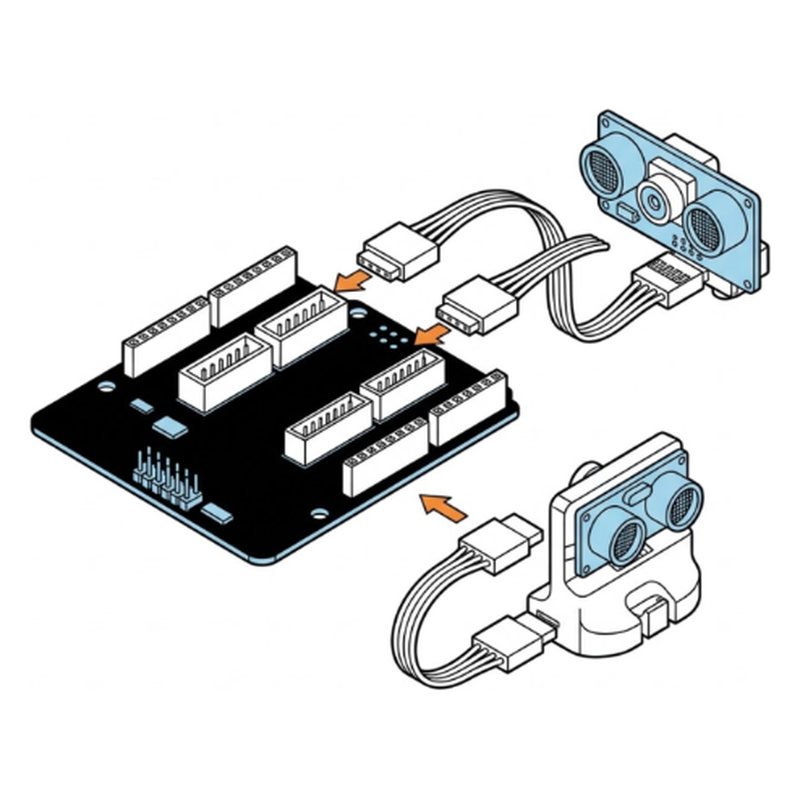
ELEGOO Smart Robot Car V4 step 16: Plug in the eyes and the camera
Step 16 of 29

Plug in the eyes and the camera

Connect the ultrasonic sensor to its port with a 4 wire cable, then plug the camera cable into the camera port.

4 wire cable

Check: Both 4 wire cables clicked in.

Common mistake: Swapping the two plugs. Check the port labels on the board.

See this step in the full build guide

Still stuck?

Show the AI coach a photo

Open step 16 in the free build tool, tap Stuck and take a photo. The coach checks it against that exact step and tells you what to change. 3 free questions per kit.

Open step 16 →

Other ELEGOO V4 problems

All 8 ELEGOO V4 problems and fixes · The full build guide

ELEGOO Smart Robot Car Kit V4.0About $66 to $80. Every part and tool in one box.
Check price on Amazon

Sources

Drawings by robotsforthat. ELEGOO Smart Robot Car V4 is a trademark of ELEGOO. We are not affiliated with ELEGOO.