Step 16 of 49
Plug in the battery
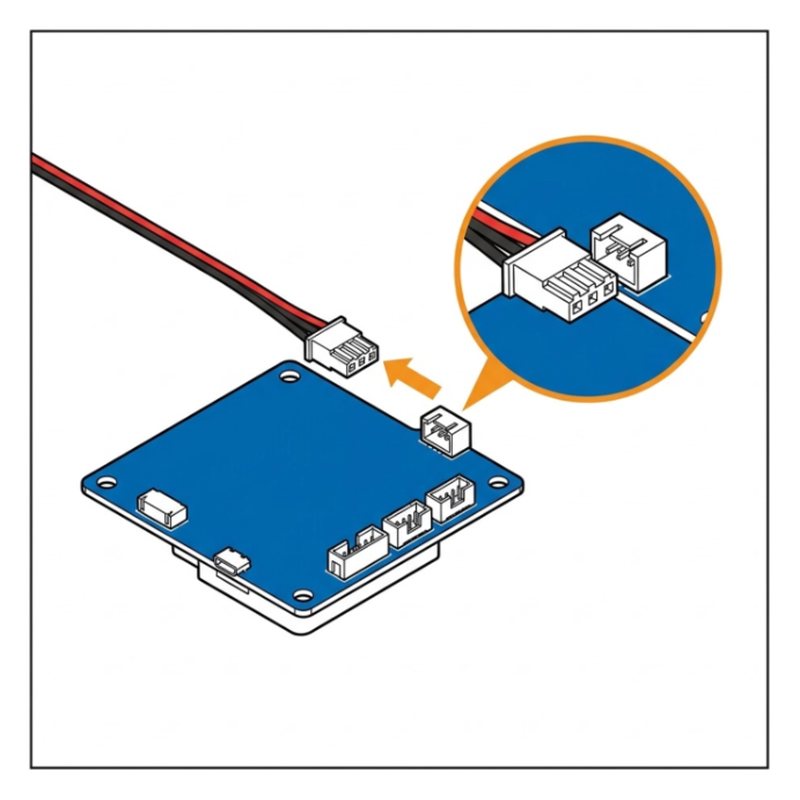
Plug the battery wire into the port marked BATTERY on the shield.
Check: The plug clicks in at BATTERY.
Common mistake: Plugging the battery into a motor port. It goes only into BATTERY.
Researched by Riley Hart · based on SunFounder GalaxyRVR build guide and docs · we may earn a commission
The battery plug is loose or the battery is flat. Start with this: Check the battery plug is fully in at BATTERY (step 16).
The battery plug is loose or the battery is flat.
Plug the battery wire into the port marked BATTERY on the shield.
Check: The plug clicks in at BATTERY.
Common mistake: Plugging the battery into a motor port. It goes only into BATTERY.
Open step 16 in the free build tool, tap Stuck and take a photo. The coach checks it against that exact step and tells you what to change. 3 free questions per kit.
Drawings by robotsforthat. SunFounder GalaxyRVR is a trademark of SunFounder. We are not affiliated with SunFounder.