Skip to content
Live
Updated 2026-10-27

How to build the SunFounder GalaxyRVR, step by step

Researched by Riley Hart · based on SunFounder GalaxyRVR build guide and docs · we may earn a commission

The GalaxyRVR is a six wheel Mars rover kit you drive from your phone. This guide breaks the build into 49 small steps, each with its own drawing, the exact screws to use and the mistake most people make on that step.

Short answer

Plan for 3 to 4 hours. Build the body and legs first, then the board and battery, motors and wheels, sensors, camera and solar roof. No soldering and no coding. A parent and a kid can do it together in one afternoon.

Kit priceAbout $130
Build time3 to 4 hours
Steps49
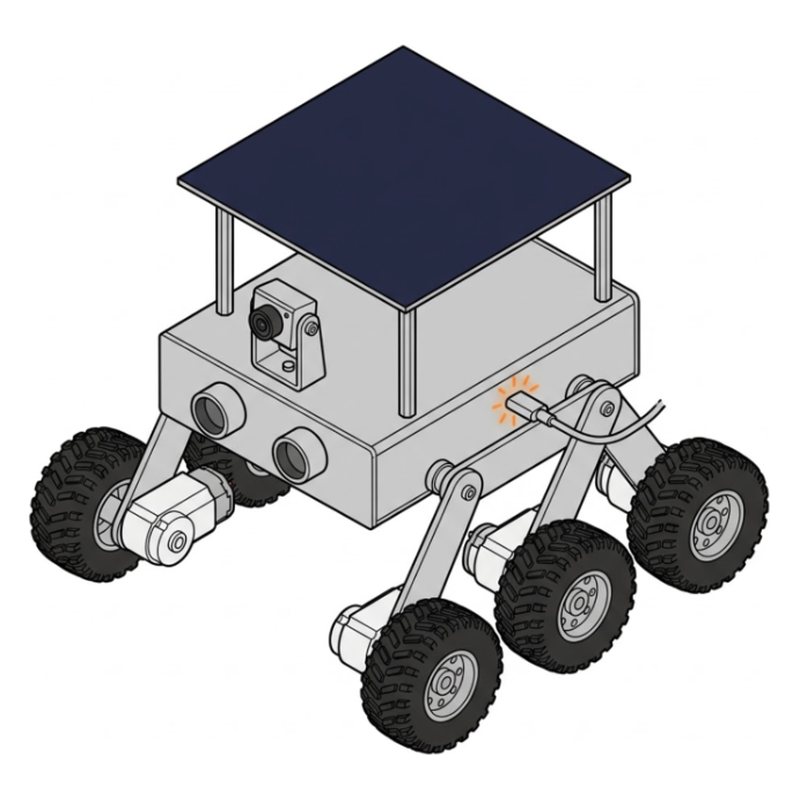
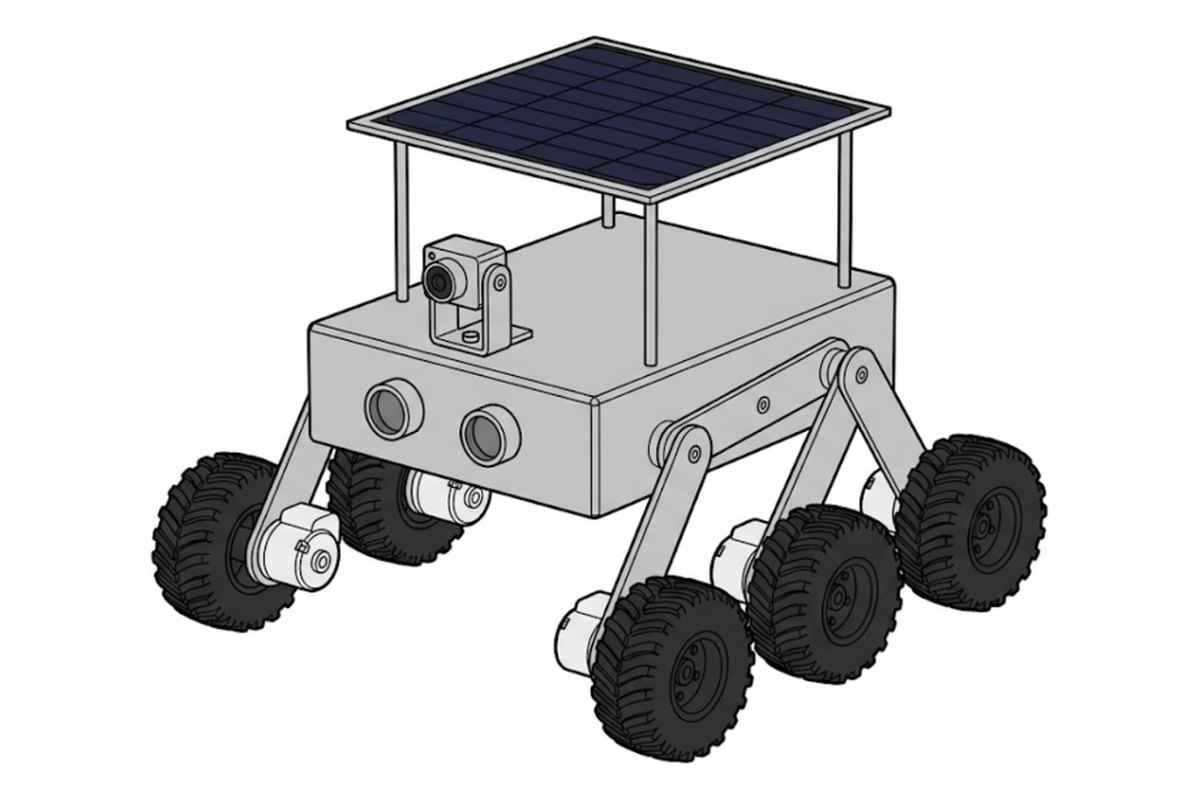
The finished SunFounder GalaxyRVR mars rover
What you will build
Free build tool

Build it with a check after every step

Same 49 steps on your phone, one at a time. Tick what you should see, and if something looks off, the AI coach checks a photo of your build.

Start building →

Part 1: Get ready

SunFounder GalaxyRVR step 1: Clear a table and sort the parts
Step 1 of 49

Clear a table and sort the parts

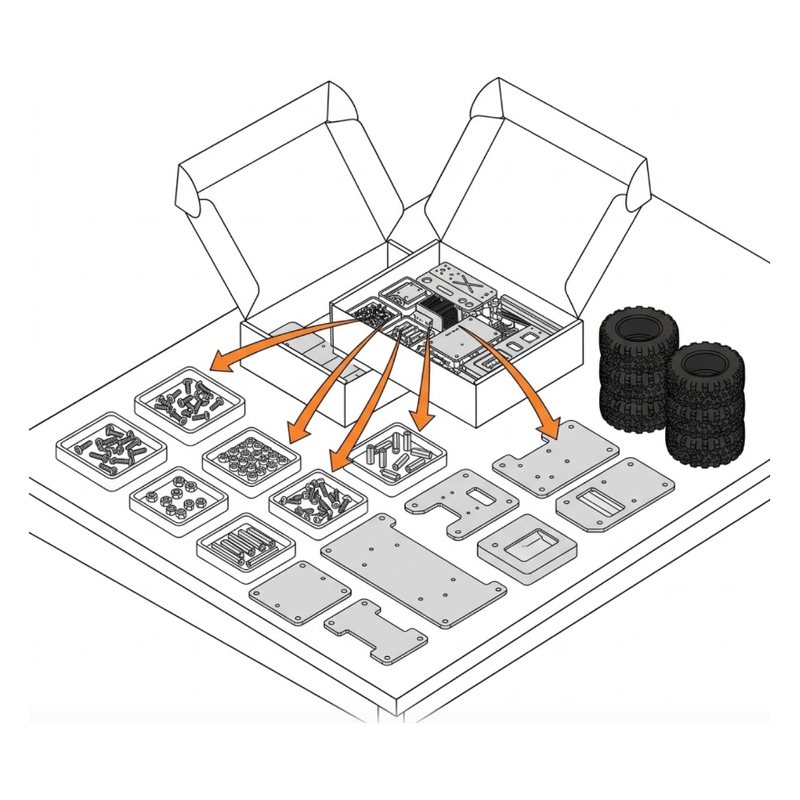
Open the box on a big table. Sort the screws, nuts and plates into small piles so each one is easy to find.

Tip: A muffin tin or a few small bowls make the screw piles easy.

Check: Screws and nuts are in separate piles.

Common mistake: Pouring every bag out together. Keep screws in their bags until you sort them by size.
SunFounder GalaxyRVR step 2: Check nothing is missing
Step 2 of 49

Check nothing is missing

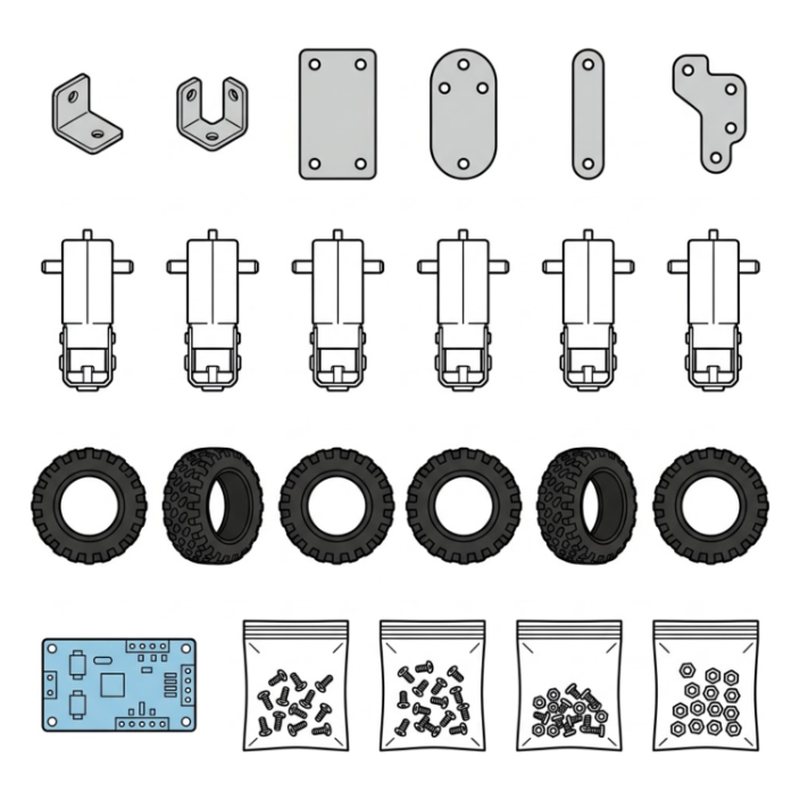
Check every bag, plate and board is there. Screws come with a few spares, so do not worry about a missing one.
Check: Every bag, plate and board is there.

Common mistake: Counting screws one by one. Bags have spares, so only check plates, boards and motors.

Part 2: Body and legs

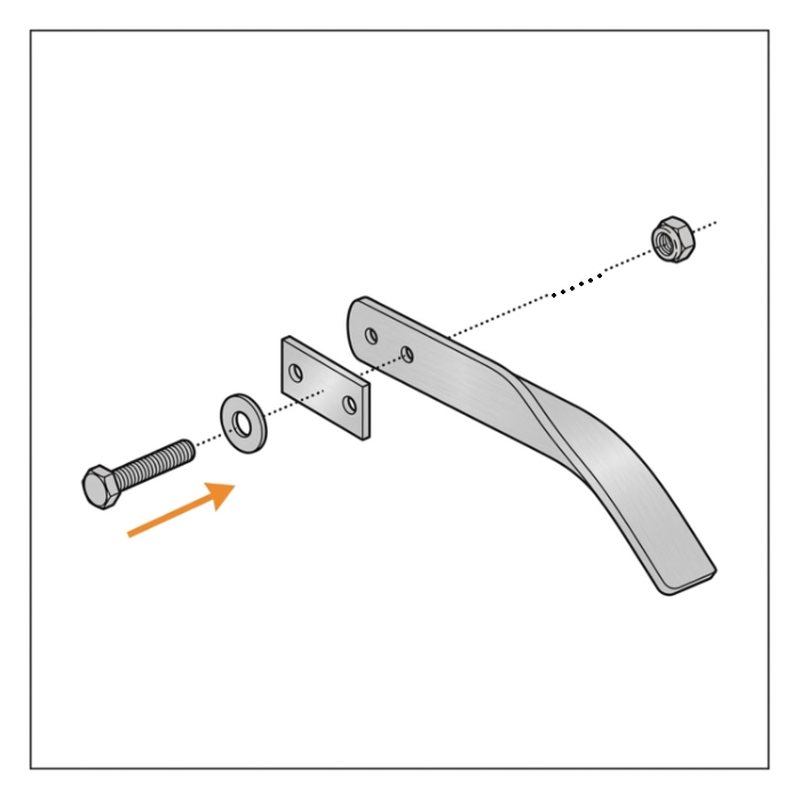
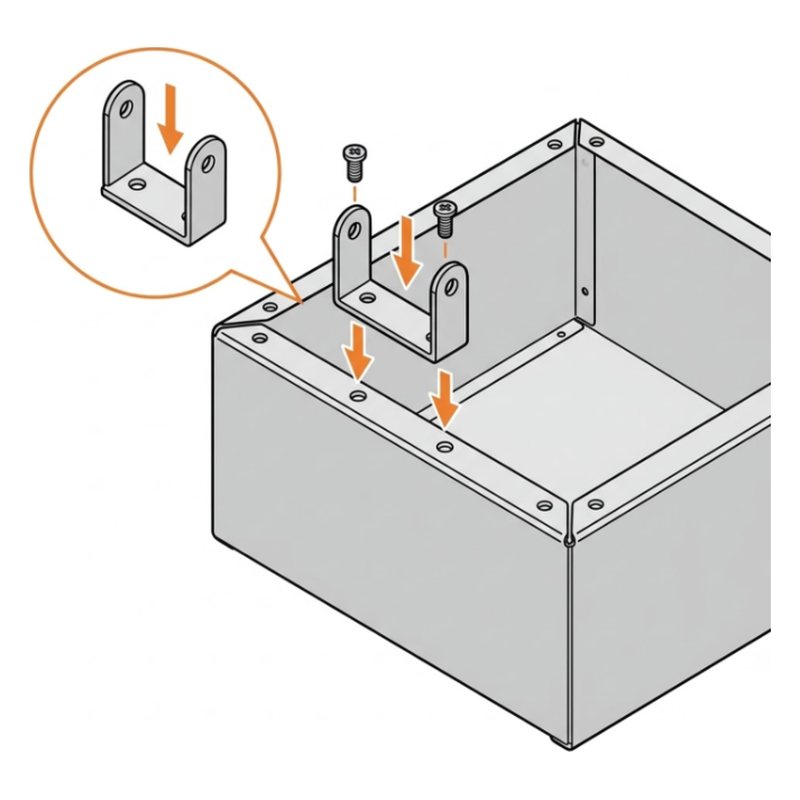
SunFounder GalaxyRVR step 3: Join plates A and B
Step 3 of 49

Join plates A and B

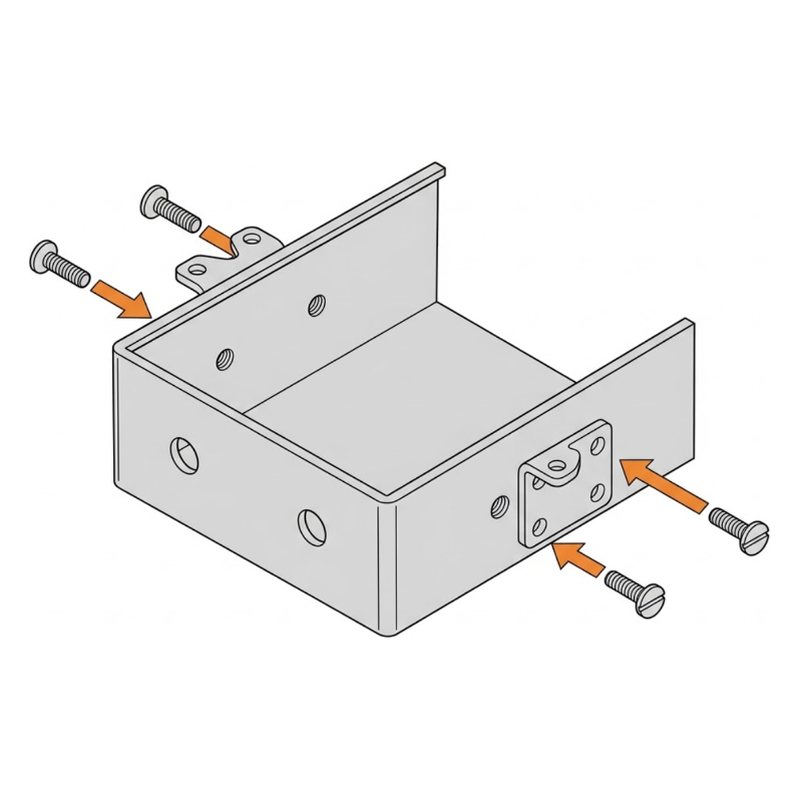
Screw the two blue brackets onto plate A and plate B with four M3x6 screws.

Plate APlate BM3x6 screws

Check: Plates A and B form the box shaped body.

Common mistake: Grabbing M3x10 screws. This step uses the short M3x6 ones.

SunFounder GalaxyRVR step 4: Build the first leg joint
Step 4 of 49

Build the first leg joint

Fix plate D to a leg with an M3x10 screw, a metal washer and a self-locking nut.

Plate DM3x10 screwMetal washerSelf-locking nutCross wrench

Tip: Use self-locking nuts and metal washers here. Plain M3 nuts and spring washers are for the motors later.

Check: Plate D is attached to the leg.

Common mistake: Using a plain nut. Leg joints need the self-locking nut and the metal washer.

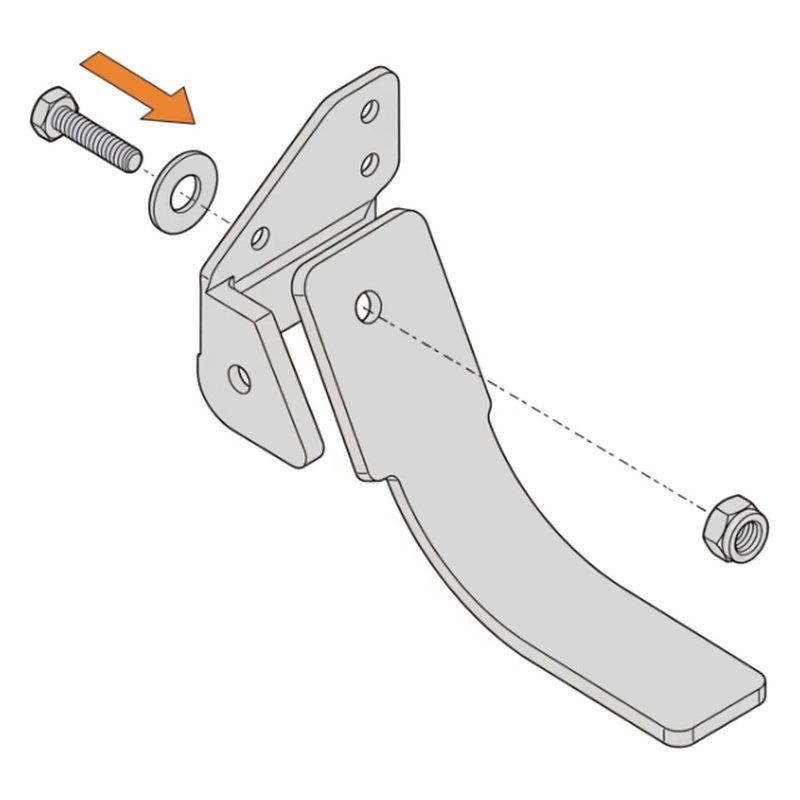
SunFounder GalaxyRVR step 5: Add plate C
Step 5 of 49

Add plate C

Fix plate C to the other leg the same way: M3x10 screw, metal washer, self-locking nut.

Plate CM3x10 screwMetal washerSelf-locking nut

Check: Both legs have their small plate.

Common mistake: Mounting plate C facing the wrong way. It should mirror plate D on the first leg.

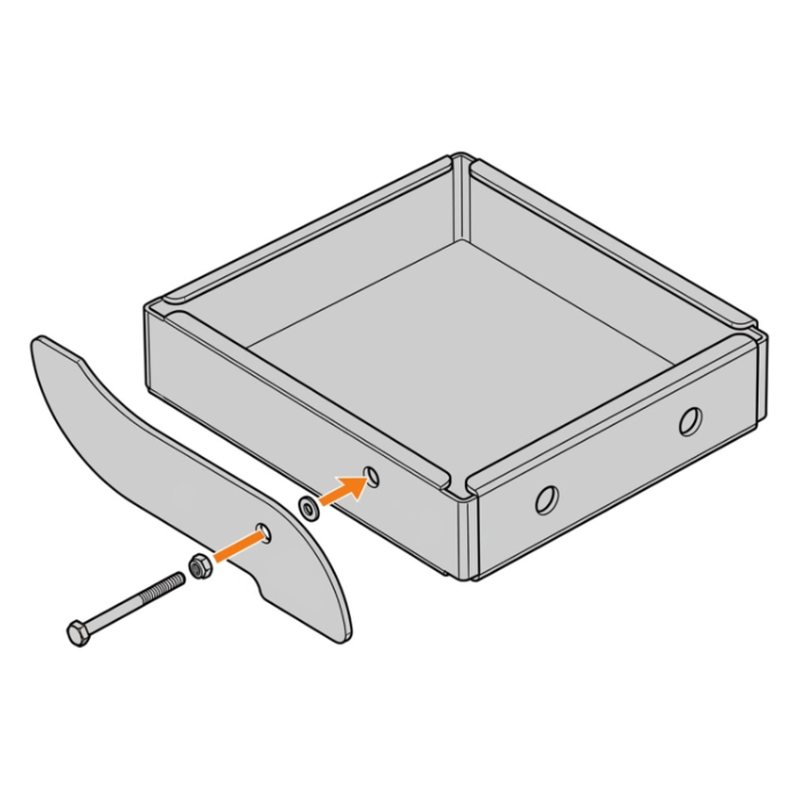
SunFounder GalaxyRVR step 6: Attach the legs to one side
Step 6 of 49

Attach the legs to one side

Fix the leg to the side of the body with an M3x25 screw, a metal washer and a self-locking nut.

M3x25 screwMetal washerSelf-locking nut

Tip: Check the small arrows printed on the parts all point the same way, toward the front.

Check: The leg hangs from one side of the body.

Common mistake: Mixing up M3x25 and M3x14 screws. Lay one next to the drawing to check the length.

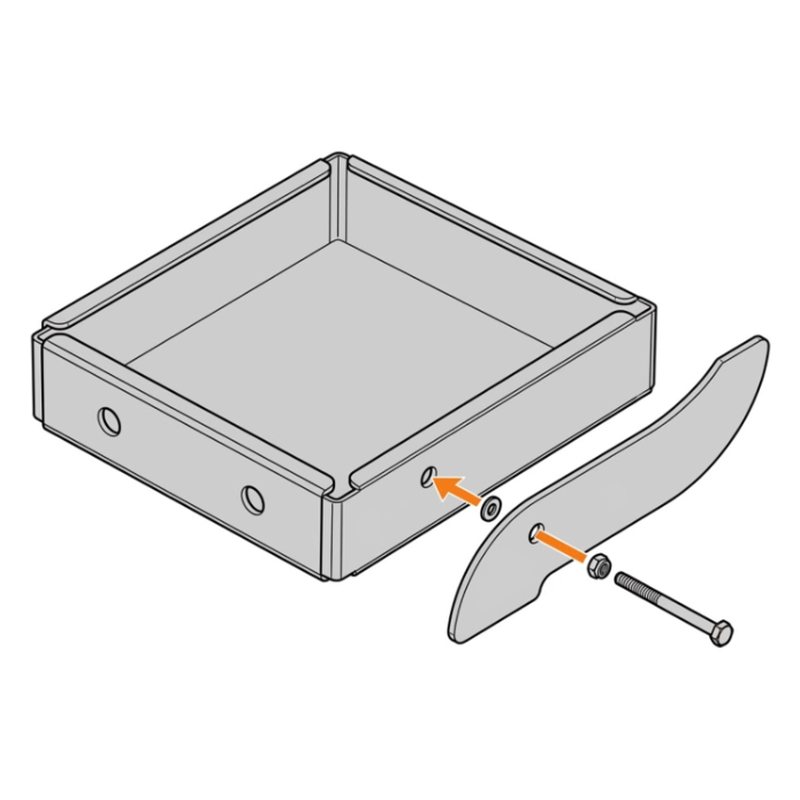
SunFounder GalaxyRVR step 7: Attach the legs to the other side
Step 7 of 49

Attach the legs to the other side

Repeat on the other side with an M3x25 screw, metal washer and self-locking nut.

M3x25 screwMetal washerSelf-locking nut

Check: Legs hang from both sides.

Common mistake: Building the second side the same as the first. It is a mirror copy, not a copy.

SunFounder GalaxyRVR step 8: Fit plate E
Step 8 of 49

Fit plate E

Fix plate E on top with an M3x10 screw, metal washer and self-locking nut.

Plate EM3x10 screwMetal washerSelf-locking nut

Check: Plate E sits across the top.

Common mistake: Overtightening the nut. The joint has to move later, so stop when it is snug.

SunFounder GalaxyRVR step 9: Link the top bar
Step 9 of 49

Link the top bar

Connect the top bar to the leg with an M3x10 screw, metal washer and self-locking nut.

M3x10 screwMetal washerSelf-locking nut

Check: The top bar links both sides.

Common mistake: Linking the bar to the wrong hole. Use the end hole of the leg, like the drawing.

SunFounder GalaxyRVR step 10: Fit the plate F joints
Step 10 of 49

Fit the plate F joints

On both sides, join plate F with an M3x14 screw, two acrylic washers and a self-locking nut.

Plate FM3x14 screwsAcrylic washersSelf-locking nuts

Check: Both plate F joints are on.

Common mistake: Forgetting the acrylic washers. Without them the joint rubs and squeaks.

SunFounder GalaxyRVR step 11: Check: the legs swing freely
Step 11 of 49

Check: the legs swing freely

Tighten the self-locking nut fully with the cross wrench, then loosen it a little so the plate can swing. Do this on every joint from the last 7 screens.

Tip: This is what lets your rover climb bumps like NASA rovers. Stiff joints mean it gets stuck.

Check: Each leg swings by itself when you lift the body. Nothing wobbles loose.

Common mistake: Leaving joints tight. A stiff leg makes the rover tip over on bumps.

Part 3: Brain and battery

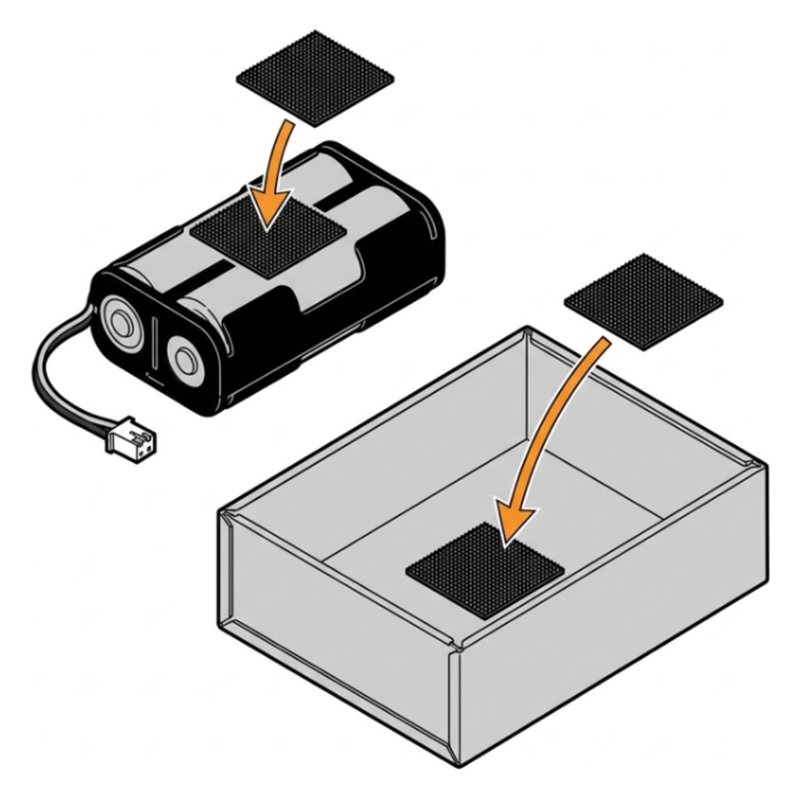
SunFounder GalaxyRVR step 12: Add the Velcro stickers
Step 12 of 49

Add the Velcro stickers

Stick one Velcro sticker on the battery and the matching one inside the body.

Velcro stickerBattery

Check: Both stickers are on.

Common mistake: Putting the Velcro too close to the edge. Keep it centered so the battery sits flat.

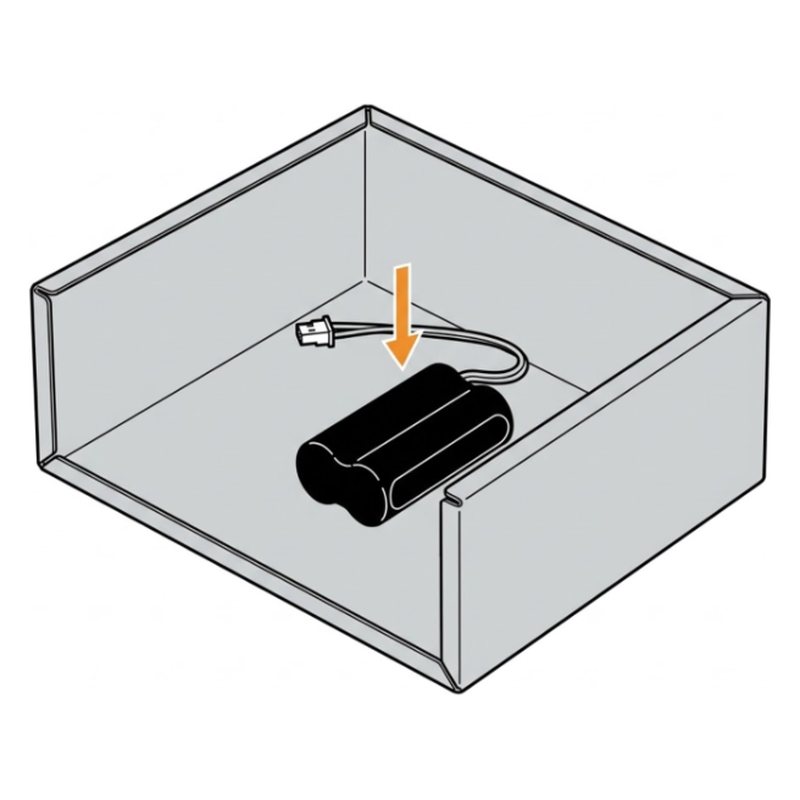
SunFounder GalaxyRVR step 13: Mount the battery
Step 13 of 49

Mount the battery

Press the battery onto the Velcro inside the body, with its wire free so it reaches the board above.

Battery

Check: The battery sits firm and the wire reaches up.

Common mistake: Burying the battery wire under the battery. Leave it free so it reaches the board.

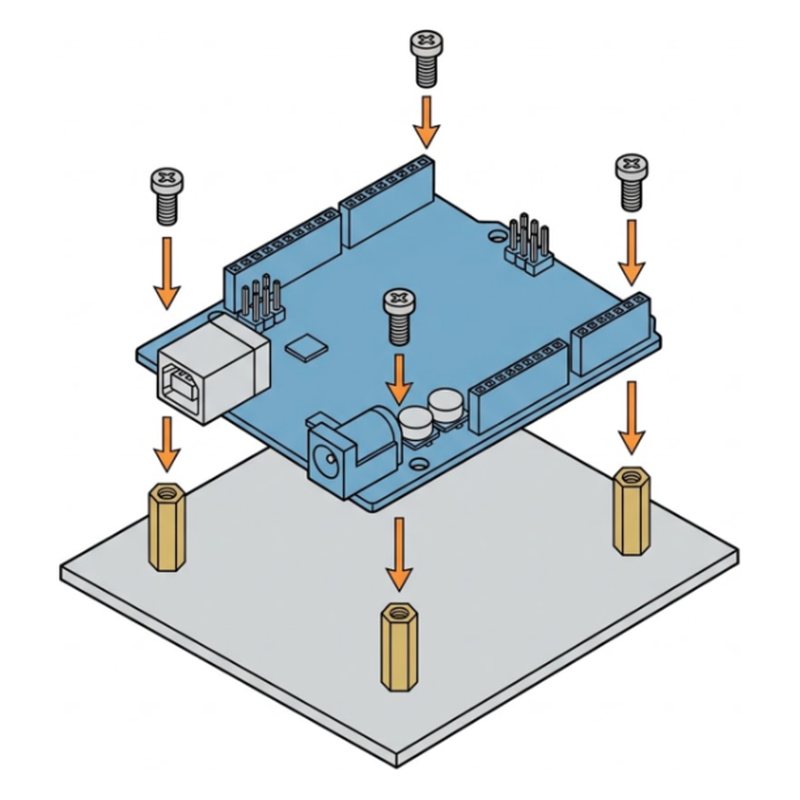
SunFounder GalaxyRVR step 14: Mount the R3 board
Step 14 of 49

Mount the R3 board

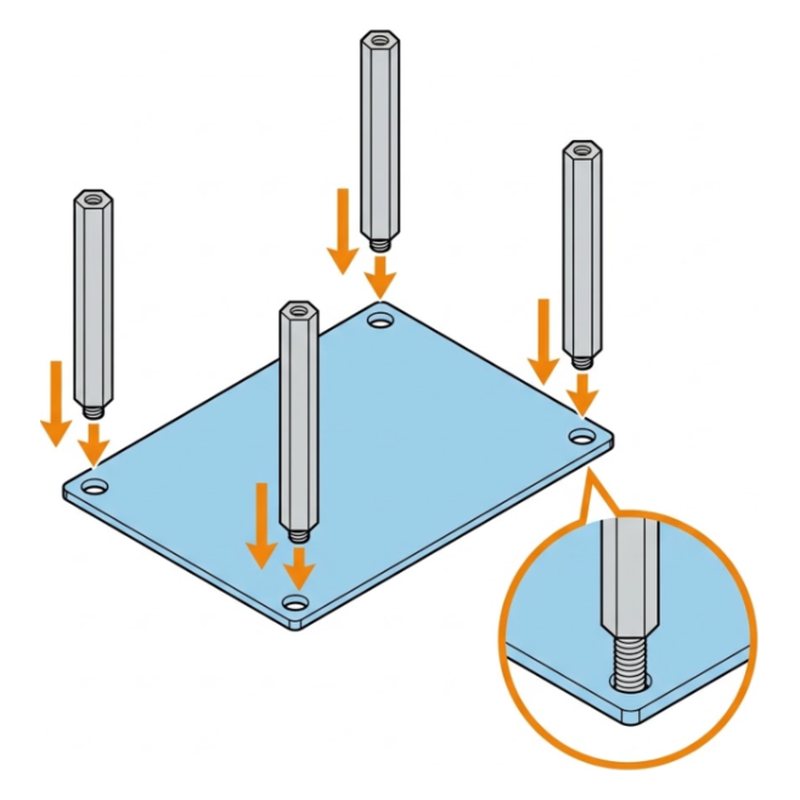
Screw four M3x8+6 standoffs onto the top plate, then fix the R3 board on them with four M3x6 screws.

R3 boardM3x8+6 standoffsM3x6 screws

Check: The board sits flat on four posts.

Common mistake: Screwing the standoffs in crooked. Turn them by hand first, then finish with the tool.

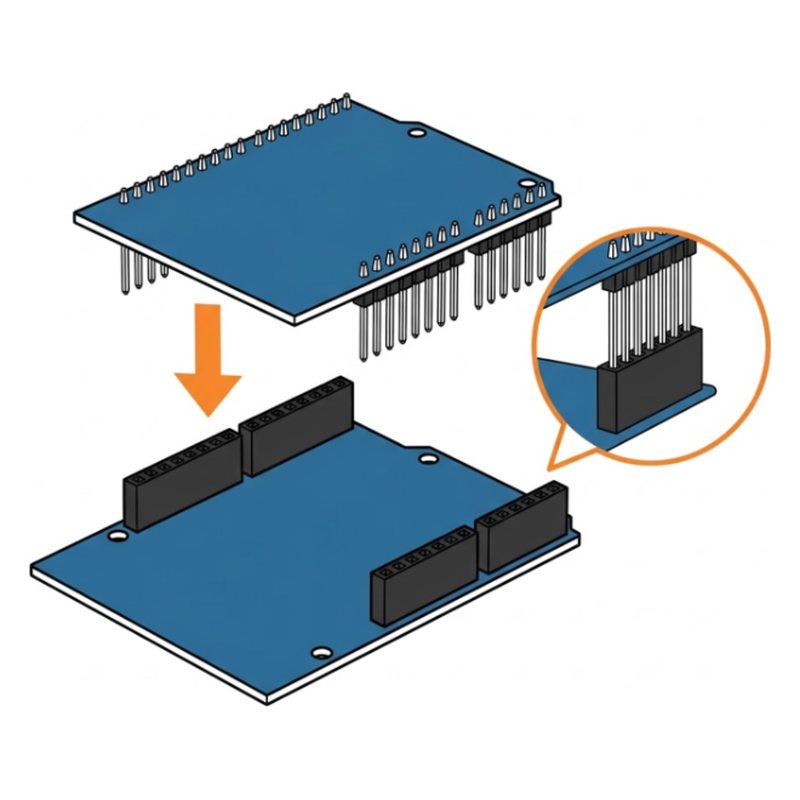
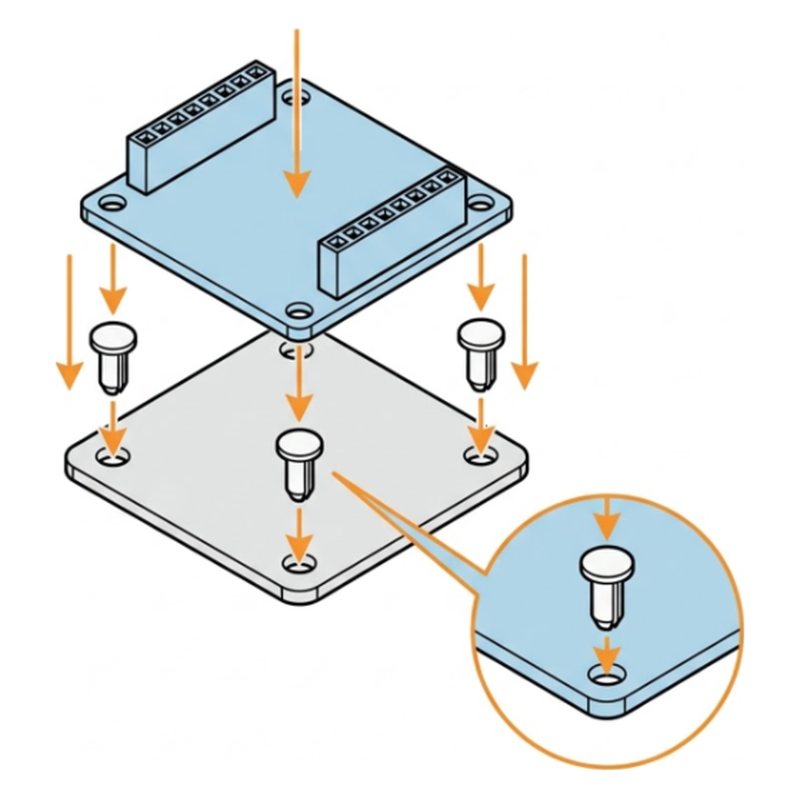
SunFounder GalaxyRVR step 15: Press the shield on top
Step 15 of 49

Press the shield on top

Line up all the pins of the GalaxyRVR shield with the R3 board and press it straight down.

GalaxyRVR shield

Tip: Look along the side before pressing. A pin outside its hole bends and stops the rover working.

Check: No pins are showing outside the black sockets.

Common mistake: Pressing the shield at an angle. One bent pin can stop the whole rover.

SunFounder GalaxyRVR step 16: Plug in the battery
Step 16 of 49

Plug in the battery

Plug the battery wire into the port marked BATTERY on the shield.

Check: The plug clicks in at BATTERY.

Common mistake: Plugging the battery into a motor port. It goes only into BATTERY.

Part 4: Motors and wheels

SunFounder GalaxyRVR step 17: Fit the six motors
Step 17 of 49

Fit the six motors

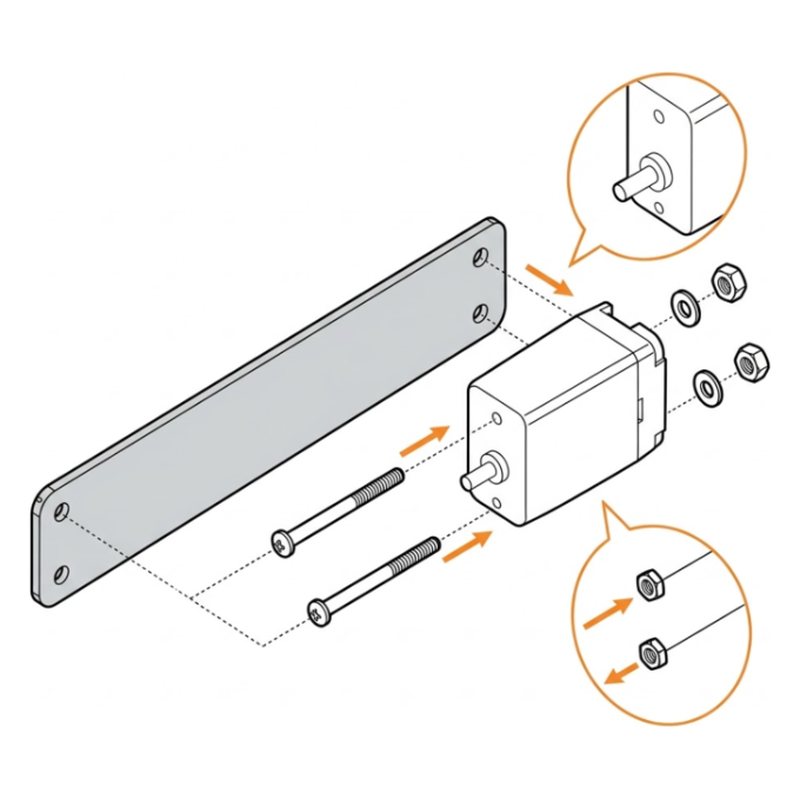
Fix each motor to its leg with two M3x25 screws, a spring washer and an M3 nut. Do all six.

6 motorsM3x25 screwsSpring washersM3 nuts

Tip: Motors use plain M3 nuts and spring washers, not self-locking nuts and metal washers.

Check: All six motors are fixed and do not wiggle.

Common mistake: Using self-locking nuts on the motors. Motors take plain M3 nuts and spring washers.

SunFounder GalaxyRVR step 18: Plug in the left motors
Step 18 of 49

Plug in the left motors

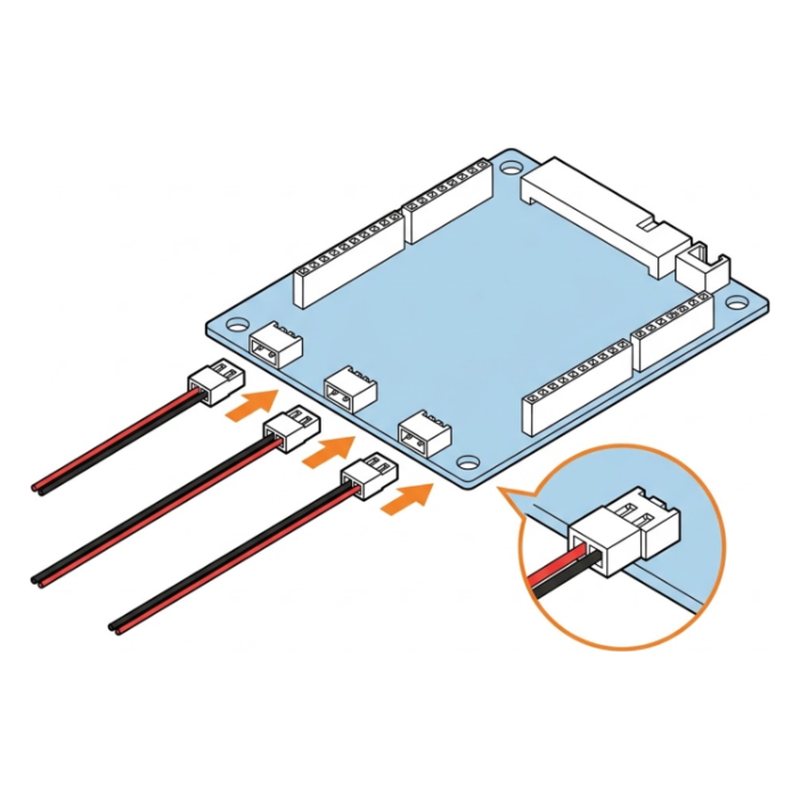
Plug the three left side motor wires into the left ports A, B and C, routing the wires along the top bar.

Tip: Front motor to A, middle to B, back to C. If a wheel spins the wrong way later, swap its plug.

Check: Three plugs in LEFT.

Common mistake: Leaving plugs half in. Push until the plug sits flat in the port.

SunFounder GalaxyRVR step 19: Plug in the right motors
Step 19 of 49

Plug in the right motors

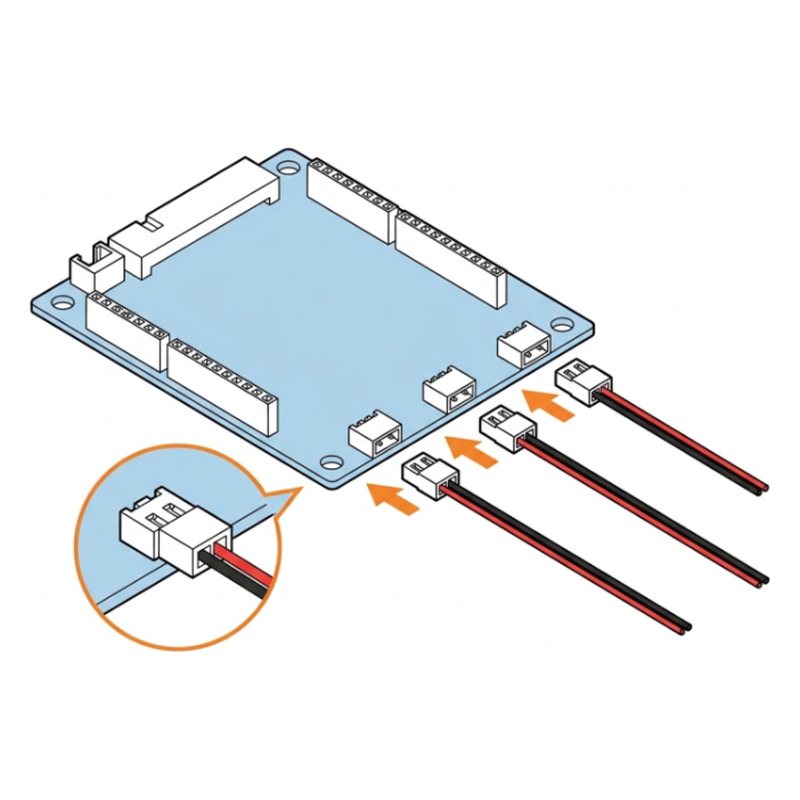
Plug the right side motor wires into the RIGHT ports in the order D, E, F.

Check: Three plugs in RIGHT.

Common mistake: Using the left ports twice. Right motors go only in D, E and F.

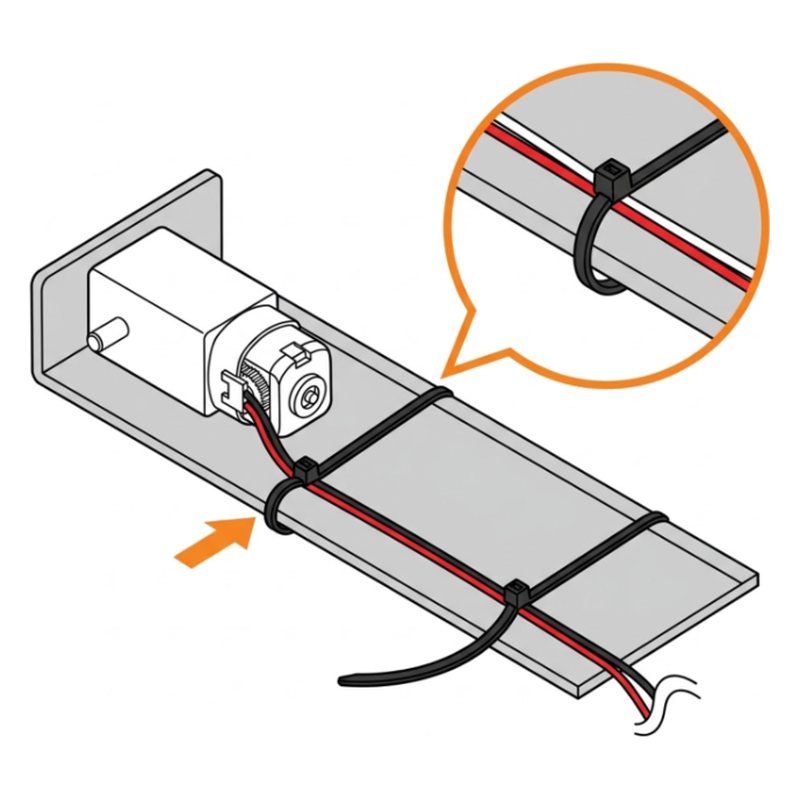
SunFounder GalaxyRVR step 20: Tie the motor wires
Step 20 of 49

Tie the motor wires

Use the cable ties to hold the motor wires against the frame, away from the wheels.

Tip: Loose wires get caught in the wheels and snap. Reviewers hit exactly this.

Check: No wire can touch a wheel.

Common mistake: Pulling ties so tight they pinch the wire. Snug is enough.

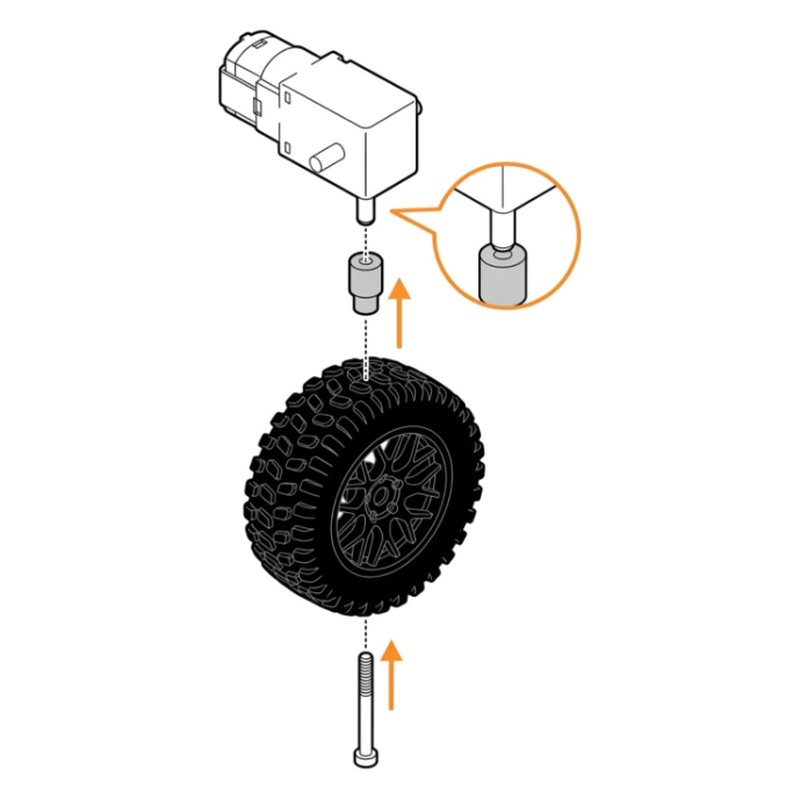
SunFounder GalaxyRVR step 21: Put on the wheels
Step 21 of 49

Put on the wheels

Push a shaft adapter onto each motor, then fix the wheel with an M2.3x20 screw. Do all six.

6 wheelsShaft adaptersM2.3x20 screws

Check: Six wheels on. Each spins by hand.

Common mistake: Skipping the shaft adapter. The wheel will wobble and fall off.

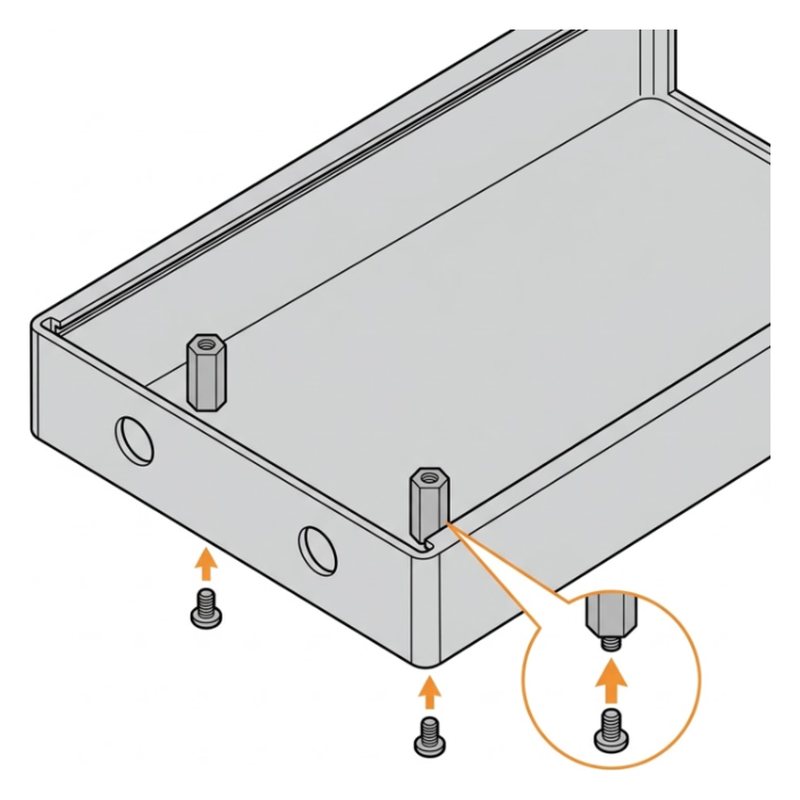
SunFounder GalaxyRVR step 22: Fit the front posts
Step 22 of 49

Fit the front posts

Screw two M3x28 standoffs onto the front of the body with M3x6 screws.

M3x28 standoffsM3x6 screws

Check: Two tall posts stand at the front.

Common mistake: Using the shorter standoffs. These are the tall M3x28 ones.

SunFounder GalaxyRVR Mars Rover Kit$129.99 at SunFounder. Every part and tool in one box.
See it at SunFounder store

Part 5: Sensors and lights

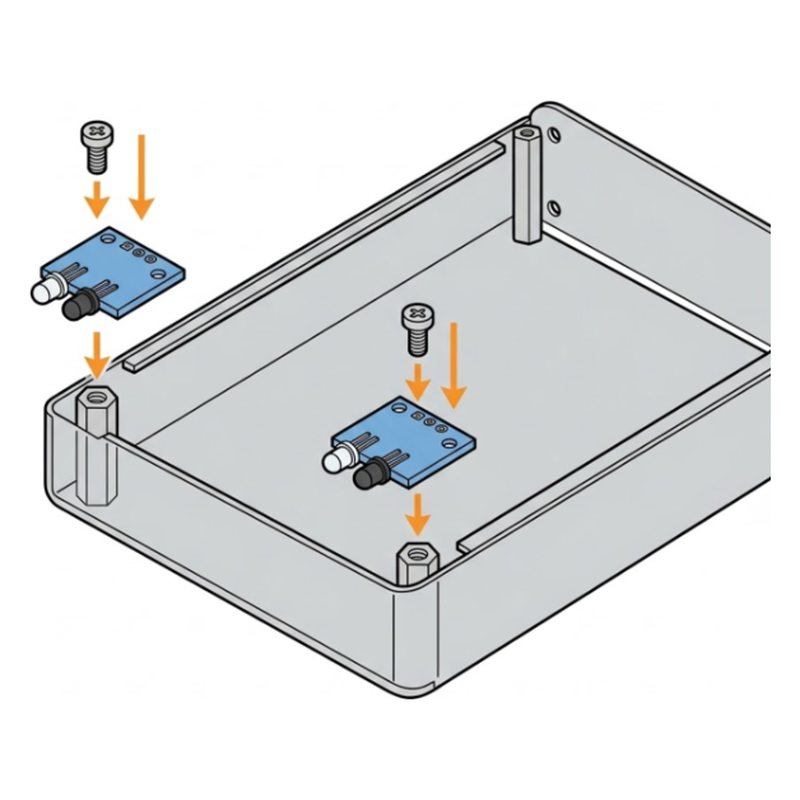
SunFounder GalaxyRVR step 23: Mount the two IR sensors
Step 23 of 49

Mount the two IR sensors

Fix the two IR obstacle sensors on M3x8+6 standoffs at the front with M3x6 screws.

IR obstacle avoidance modulesM3x8+6 standoffsM3x6 screws

Check: One sensor on each front corner.

Common mistake: Mounting a sensor upside down. Both LEDs should face forward.

SunFounder GalaxyRVR step 24: Wire the IR sensors
Step 24 of 49

Wire the IR sensors

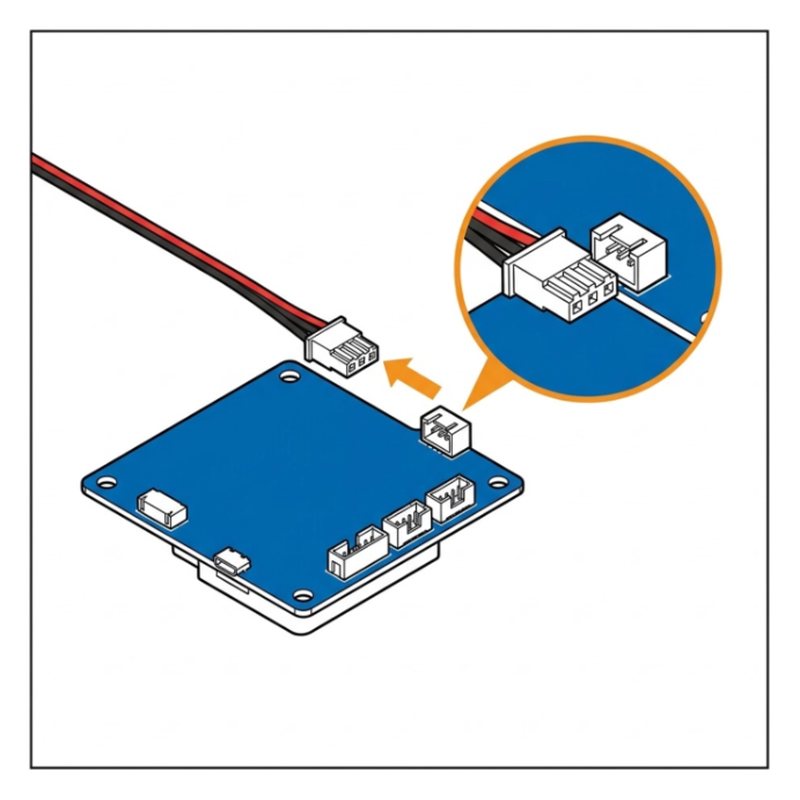
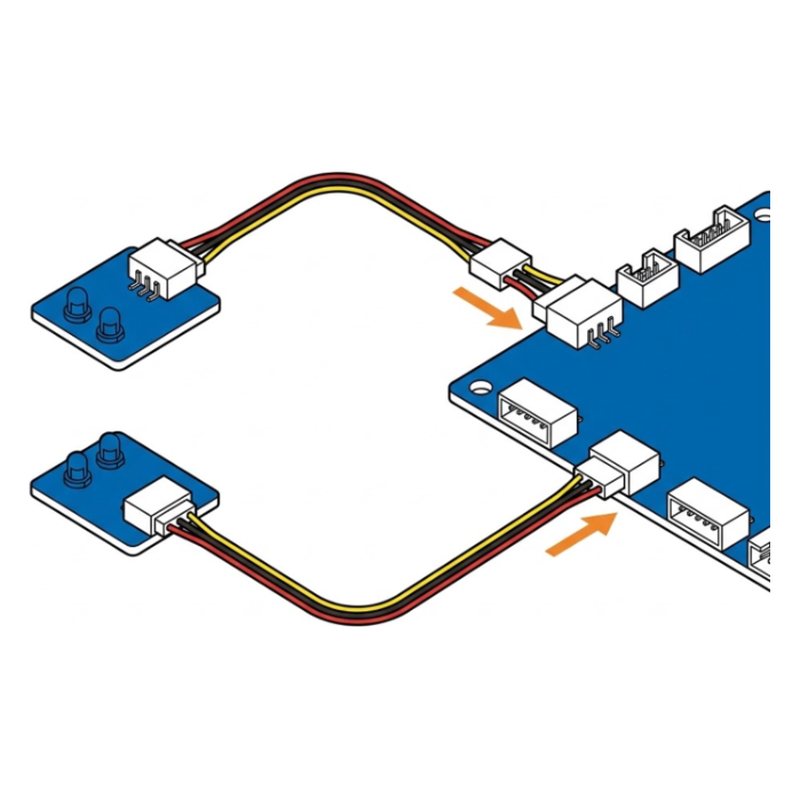
Connect each sensor to the shield with a 3-pin wire: left sensor to IR LEFT, right sensor to IR RIGHT.

Tip: Match the pin labels: OUT, + and GND on the sensor to the same labels on the cable.

Check: Both sensors are wired.

Common mistake: Swapping left and right. The left sensor goes to IR LEFT.

SunFounder GalaxyRVR step 25: Plug a wire into the ultrasonic sensor
Step 25 of 49

Plug a wire into the ultrasonic sensor

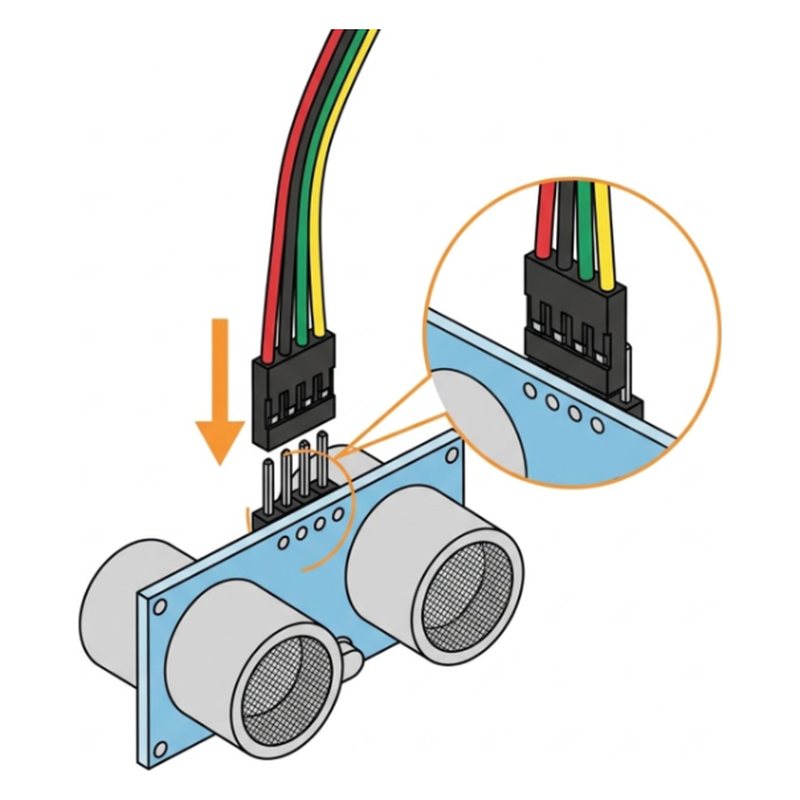
Plug the 4-pin wire into the back of the ultrasonic module (the one with two round eyes).

Check: The wire is in.

Common mistake: Forcing the plug. It only fits one way, so flip it if it resists.

SunFounder GalaxyRVR step 26: Mount the ultrasonic sensor
Step 26 of 49

Mount the ultrasonic sensor

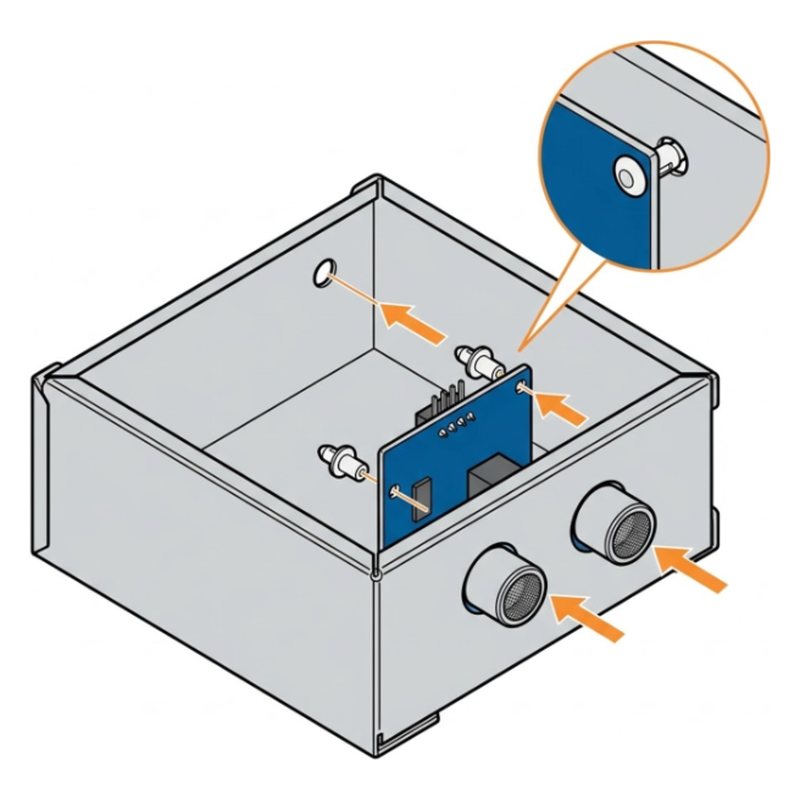
Fix it to plate G with two R3080 rivets: push the rivet in, then press its pin to lock. Plug the wire into SONAR.

Ultrasonic modulePlate GR3080 rivets

Check: The two eyes look forward. Wire plugged into SONAR.

Common mistake: Not pressing the rivet pin. Push the rivet in, then press its pin until it locks.

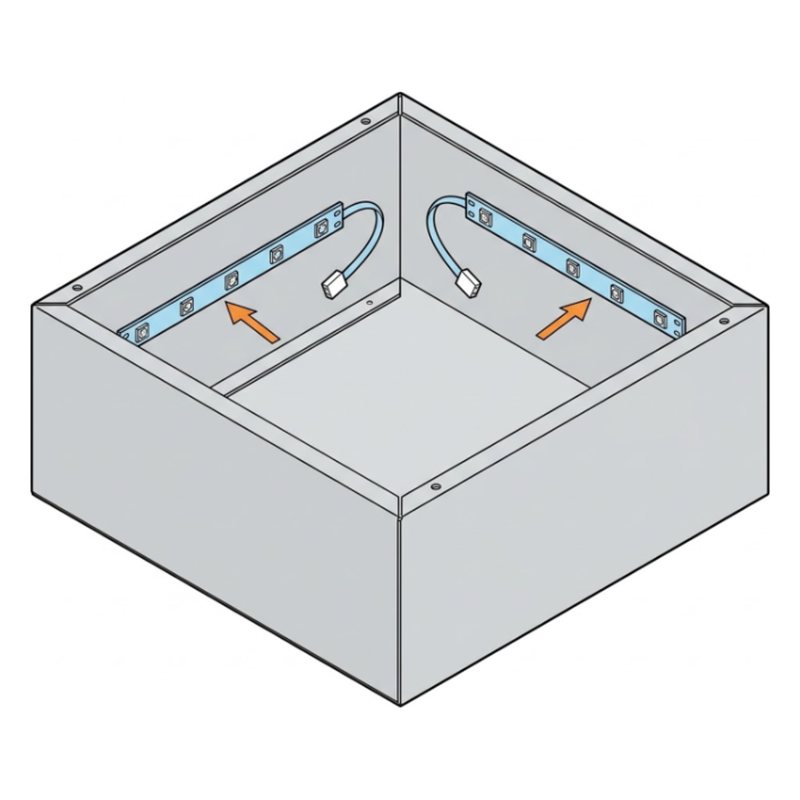
SunFounder GalaxyRVR step 27: Peel the light strips
Step 27 of 49

Peel the light strips

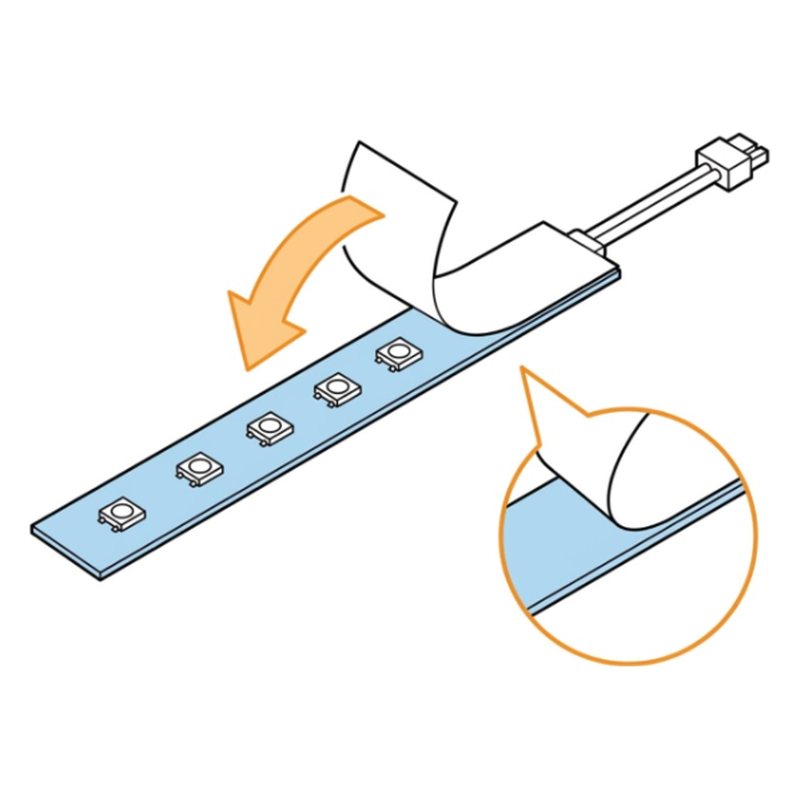
Peel the backing off the sticky side of both RGB light strips.

Check: Both strips are sticky side up.

Common mistake: Touching the sticky side. Fingerprints stop it from sticking well.

SunFounder GalaxyRVR step 28: Stick on the lights
Step 28 of 49

Stick on the lights

Stick one strip on each side inside the body and plug both into the RGB LED ports.

Check: Two strips on. Both plugged into RGB LED.

Common mistake: Sticking the strips before checking the cable reaches the port. Hold it in place first.

SunFounder GalaxyRVR step 29: Fit plate H
Step 29 of 49

Fit plate H

Screw plate H (the camera bracket) to the top front with two M3x6 screws, its two arms standing up.

Plate HM3x6 screws

Check: Plate H stands up at the front.

Common mistake: Mounting plate H backwards. Its two arms stand up at the front.

Part 6: Camera

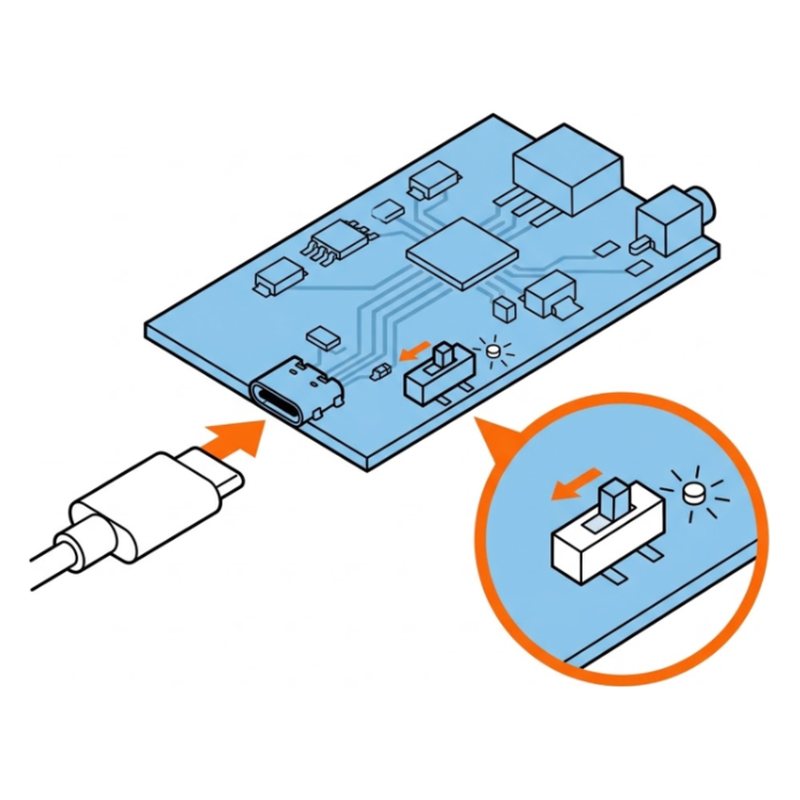
SunFounder GalaxyRVR step 30: Charge and switch on the battery
Step 30 of 49

Charge and switch on the battery

Plug the USB-C cable into the shield to charge, then slide the power switch to ON. You need power for the next step.

Tip: The servo setup needs power. The rover's preloaded program does the work.

Check: A red charge light is on. The green power light is on.

Common mistake: Skipping this step. The servo needs power to center itself next.

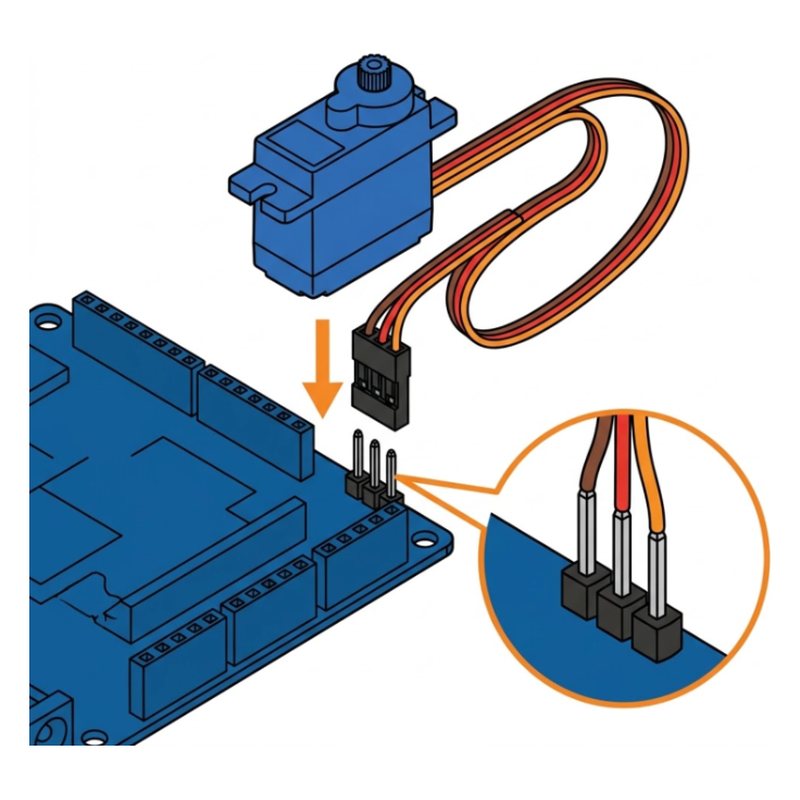
SunFounder GalaxyRVR step 31: Plug the servo into pin 6
Step 31 of 49

Plug the servo into pin 6

Plug the small servo motor's wire onto pin 6: brown to GND, red to 5V, orange to 6. It turns to its center by itself.

Tip: This puts the servo at exactly 90 degrees, so the camera points straight once mounted.

Check: The servo twitches and stops.

Common mistake: Plugging the servo in backwards. Brown goes to GND.

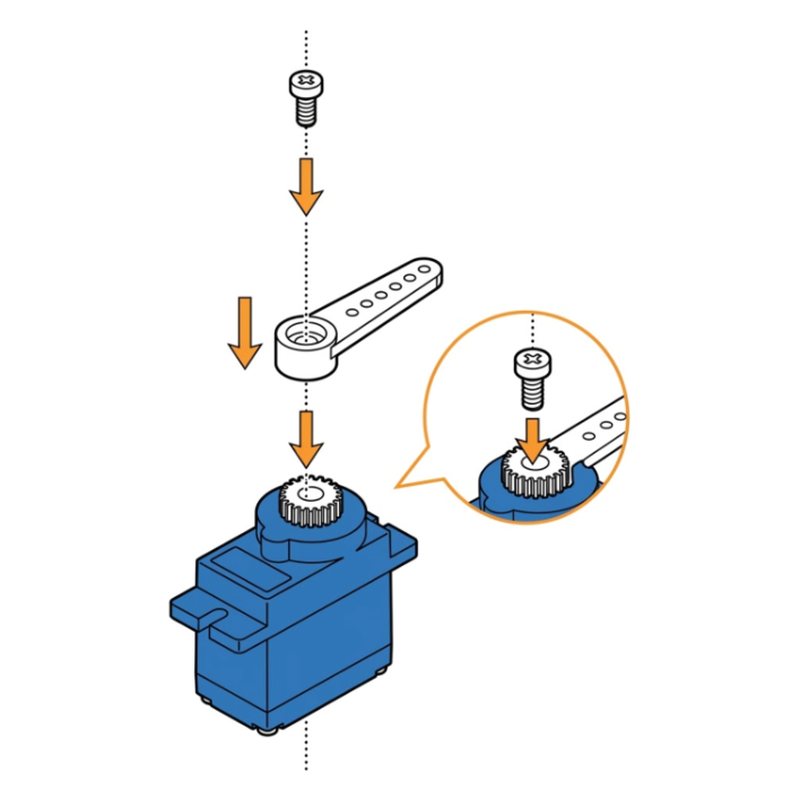
SunFounder GalaxyRVR step 32: Fit the servo arm, then power off
Step 32 of 49

Fit the servo arm, then power off

Push the servo arm on pointing straight along the servo body, then fix it with the smallest screw from the servo pack. Then slide the power switch to OFF.

Check: The arm is fixed. The power light is off.

Common mistake: Turning the servo by hand after it centered. Push the arm straight on without twisting.

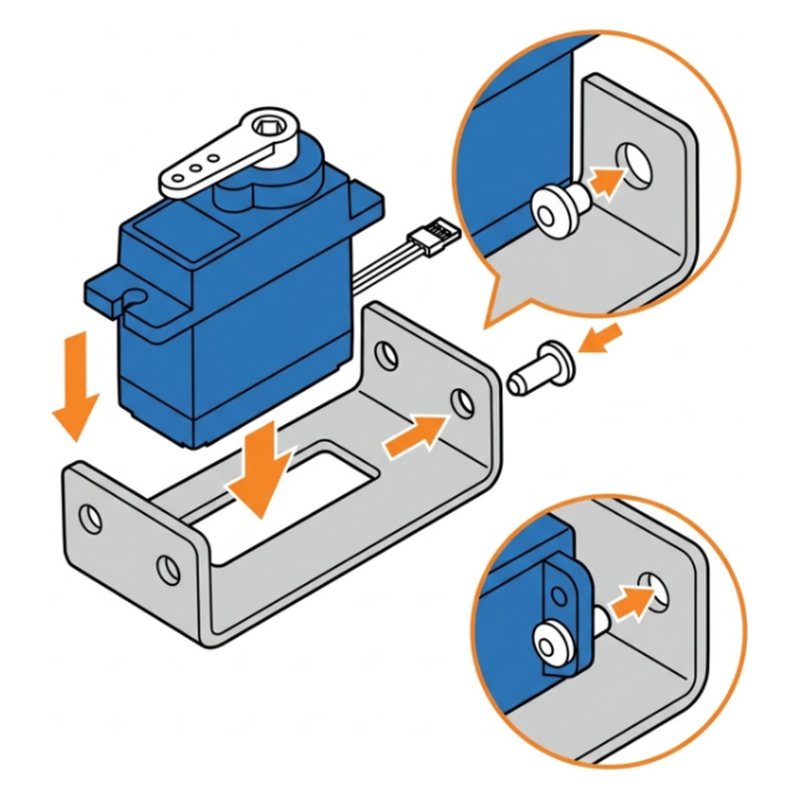
SunFounder GalaxyRVR step 33: Put the servo in plate I
Step 33 of 49

Put the servo in plate I

Fix the servo into plate I with two R2056 rivets.

ServoPlate IR2056 rivets

Check: The servo sits inside plate I.

Common mistake: Putting the servo in with its gear on the wrong side. Match the drawing.

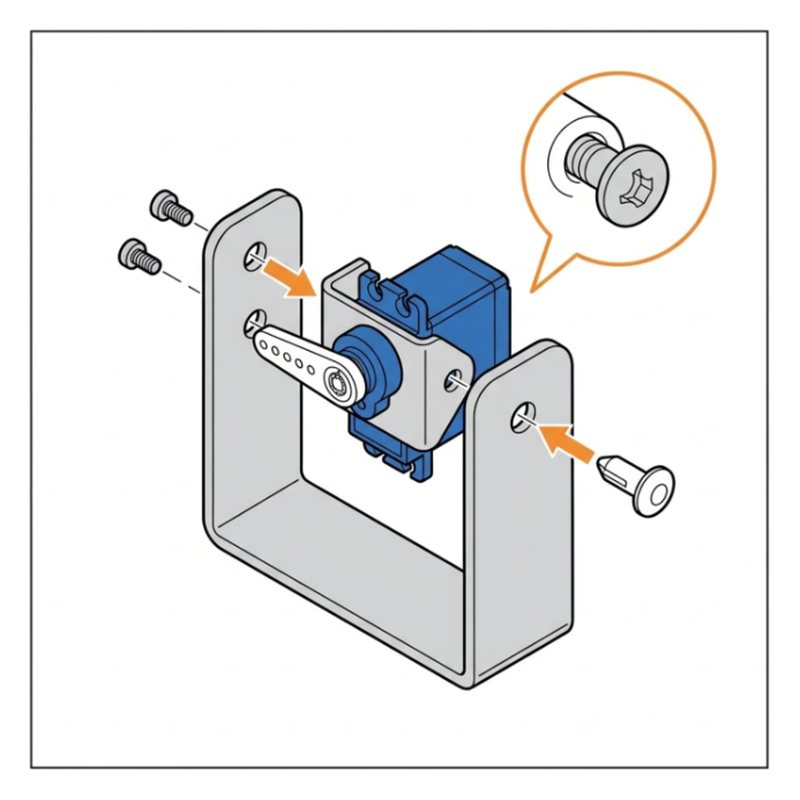
SunFounder GalaxyRVR step 34: Mount the camera tilt
Step 34 of 49

Mount the camera tilt

Attach plate I to plate H with M1.5x3 screws on the servo arm and an R3065 rivet on the other side.

M1.5x3 screwsR3065 rivet

Check: The camera mount tilts up and down.

Common mistake: Using big screws on the servo arm. These are the tiny M1.5x3 screws.

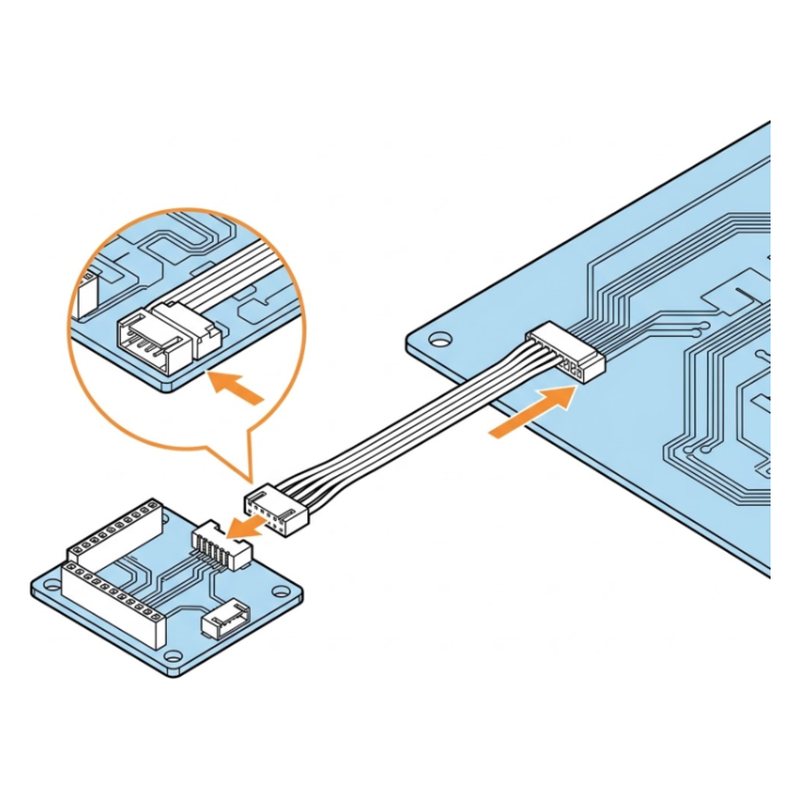
SunFounder GalaxyRVR step 35: Wire the camera adapter
Step 35 of 49

Wire the camera adapter

Plug the 5-pin wire into the camera adapter board and the other end into CAMERA on the shield.

Check: Wire plugged into CAMERA.

Common mistake: Plugging the camera wire into a sensor port. It goes into CAMERA.

SunFounder GalaxyRVR step 36: Mount the camera adapter
Step 36 of 49

Mount the camera adapter

Fix the adapter board to the mount with three R3055 rivets.

Camera adapter boardR3055 rivets

Check: The adapter sits on the mount.

Common mistake: Snapping the adapter on loose. All three rivets must lock.

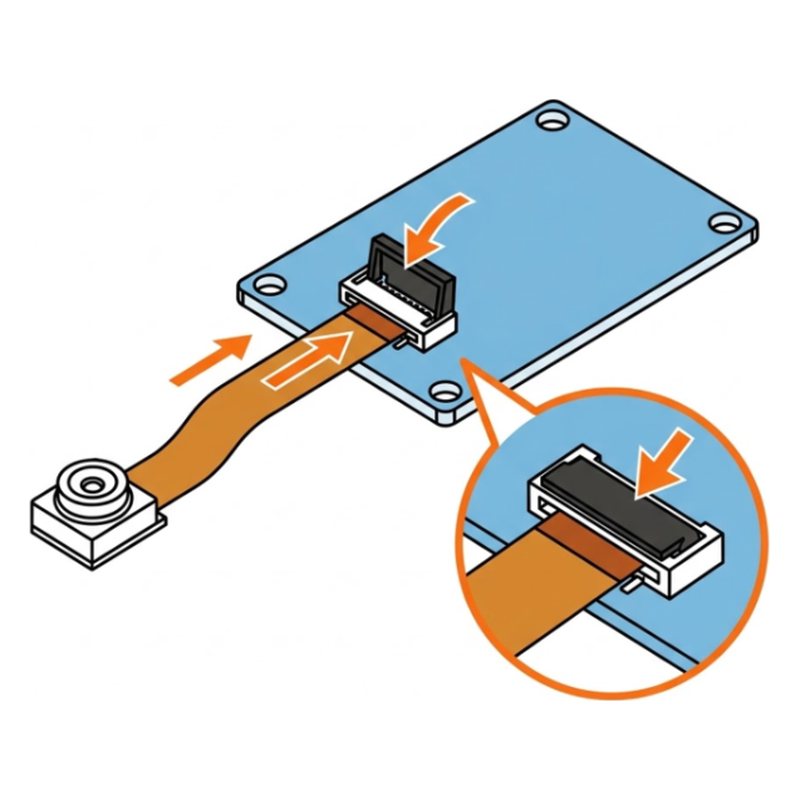
SunFounder GalaxyRVR step 37: Connect the camera lens
Step 37 of 49

Connect the camera lens

On the ESP32 CAM: lift the little latch, slide the camera ribbon in, close the latch, then stick the camera down.

Tip: The ribbon is fragile. Lift the latch gently with a fingernail.

Check: The ribbon is held by the closed latch.

Common mistake: Pulling the latch too hard. It is tiny and snaps easily. Lift it with a fingernail.

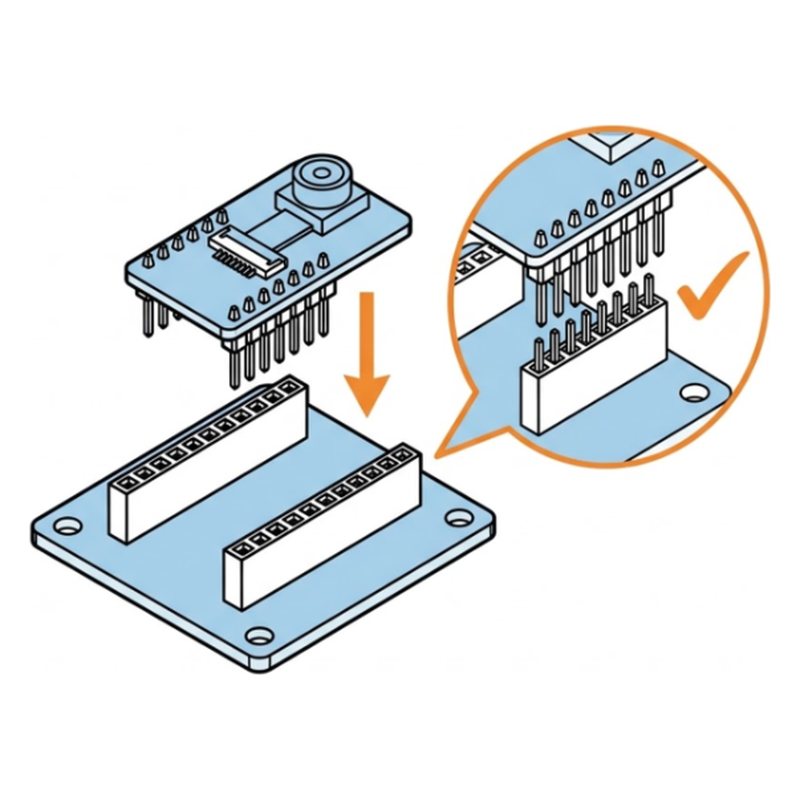
SunFounder GalaxyRVR step 38: Plug in the ESP32 CAM
Step 38 of 49

Plug in the ESP32 CAM

Push the ESP32 CAM into the adapter, lined up exactly like the drawing. Check every pin is in a socket.

Tip: SunFounder warns about this one: backwards means no video later.

Check: Camera board lines up with the adapter. Antenna on the ticked side.

Common mistake: Putting the ESP32 CAM in backwards. It is the top reason for no video.

SunFounder GalaxyRVR step 39: Close the bottom
Step 39 of 49

Close the bottom

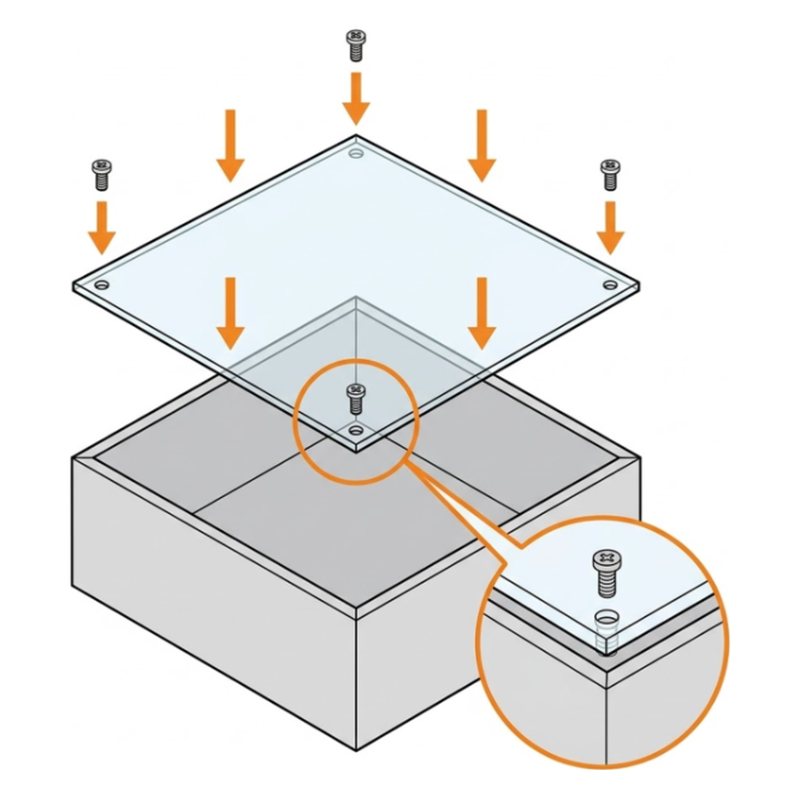
Fix the acrylic plate under the body with M3x6 screws and snap its edges in.

Acrylic plateM3x6 screws

Check: The bottom is closed.

Common mistake: Trapping a wire under the bottom plate. Check all wires are inside before you close it.

Part 7: Solar roof

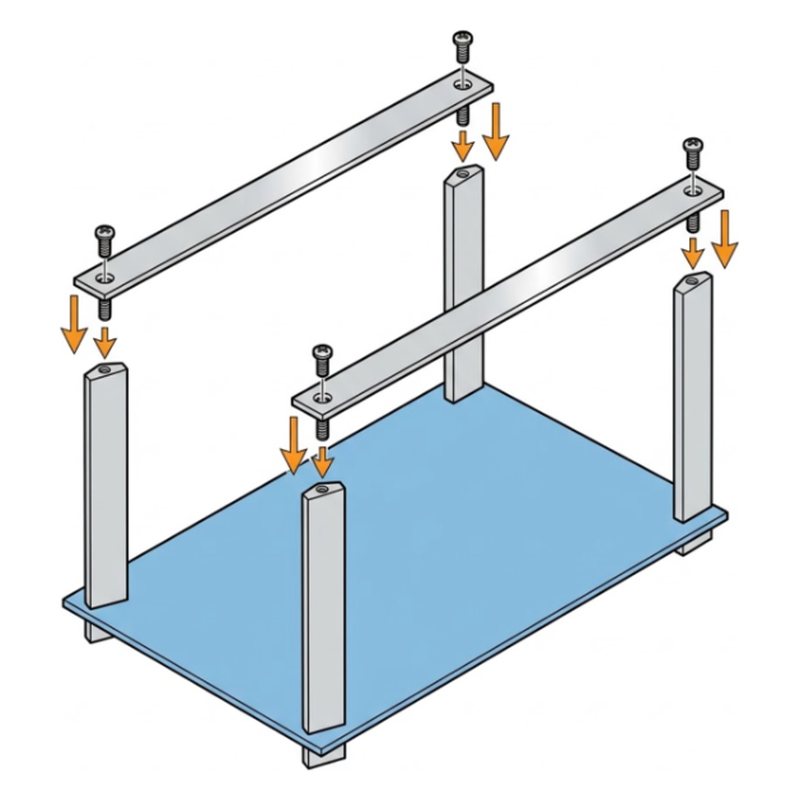
SunFounder GalaxyRVR step 40: Add the roof posts
Step 40 of 49

Add the roof posts

Screw four M3x30+6 standoffs onto the corners of the shield.

M3x30+6 standoffs

Check: Four tall posts on the board.

Common mistake: Mixing up standoff sizes. These are the tallest ones, M3x30+6.

SunFounder GalaxyRVR step 41: Add plates J and K
Step 41 of 49

Add plates J and K

Fix plates J and K across the posts with M3x6 screws.

Plate JPlate KM3x6 screws

Check: Two bars across the posts.

Common mistake: Fitting J and K before the posts are tight. Tighten the posts first.

SunFounder GalaxyRVR step 42: Stick the solar panel on plate L
Step 42 of 49

Stick the solar panel on plate L

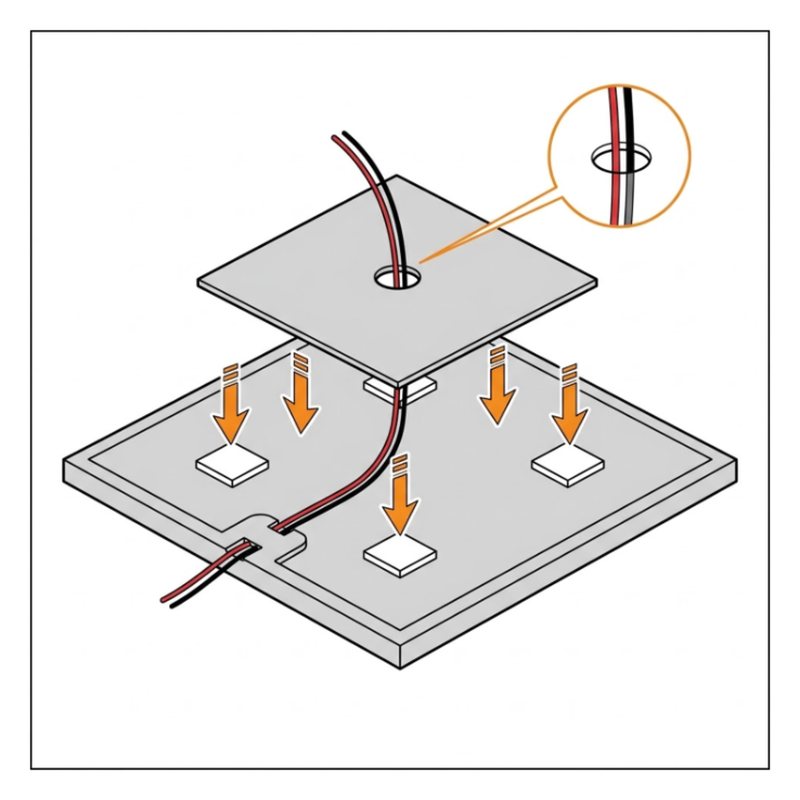
Use the foam tape to stick plate L under the solar panel, wire through the middle.

Solar panelPlate LFoam tape

Check: Plate L is stuck under the panel.

Common mistake: Covering the hole with tape. The solar wire has to pass through the middle.

SunFounder GalaxyRVR step 43: Mount the roof
Step 43 of 49

Mount the roof

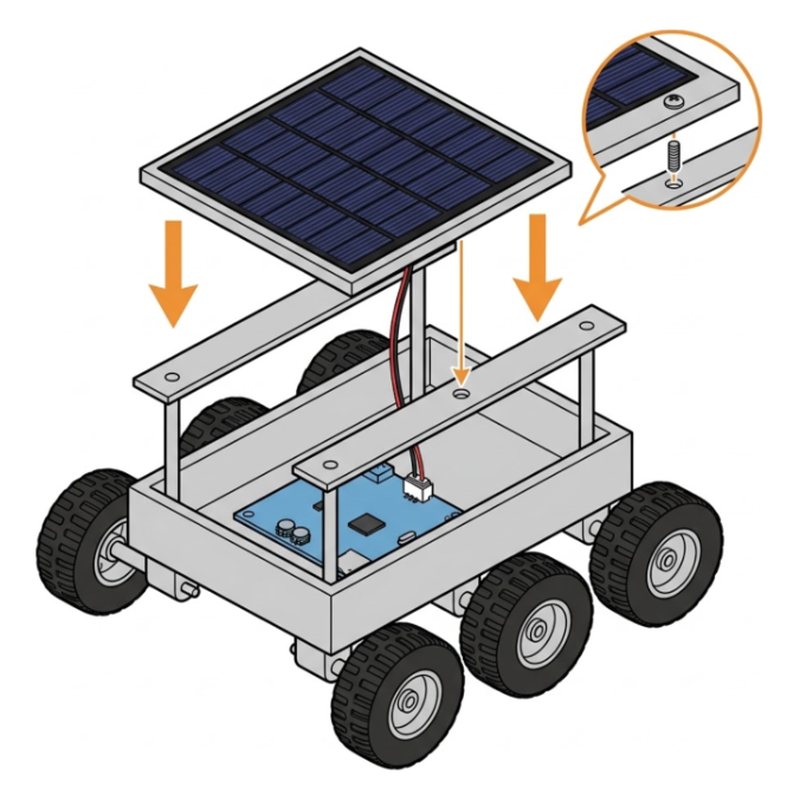
Snap the roof onto the bars, fix it with an M3x6 screw, tape the wire down with fiber tape and plug it into SOLAR.

Check: The roof is on. Wire plugged into SOLAR.

Common mistake: Leaving the solar wire loose. Tape it down so it never touches a wheel.

Part 8: Drive it

SunFounder GalaxyRVR step 44: Charge it fully
Step 44 of 49

Charge it fully

Plug in the USB-C cable (a 5V 2A phone charger works). A full charge takes about 2 hours.

Check: A red charge light is on. The orange battery lights blink.

Common mistake: Using a fast laptop charger. A plain 5V 2A phone charger is safest.

SunFounder GalaxyRVR step 45: Switch it on
Step 45 of 49

Switch it on

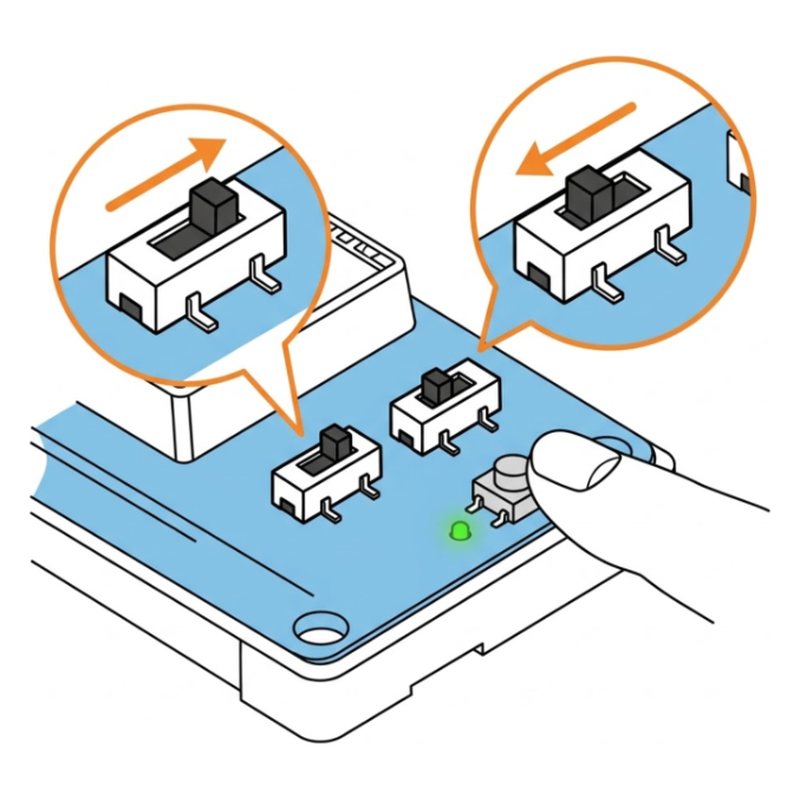
Unplug the charger. Slide the power switch to ON, slide the mode switch to the left, and press Reset once.

Tip: For driving, the mode switch always stays on the left. Right is only for uploading code.

Check: Green power light on. The light strips flash green.

Common mistake: Mode switch on the right. Right is only for uploading code, left is for driving.

SunFounder GalaxyRVR step 46: Get the app
Step 46 of 49

Get the app

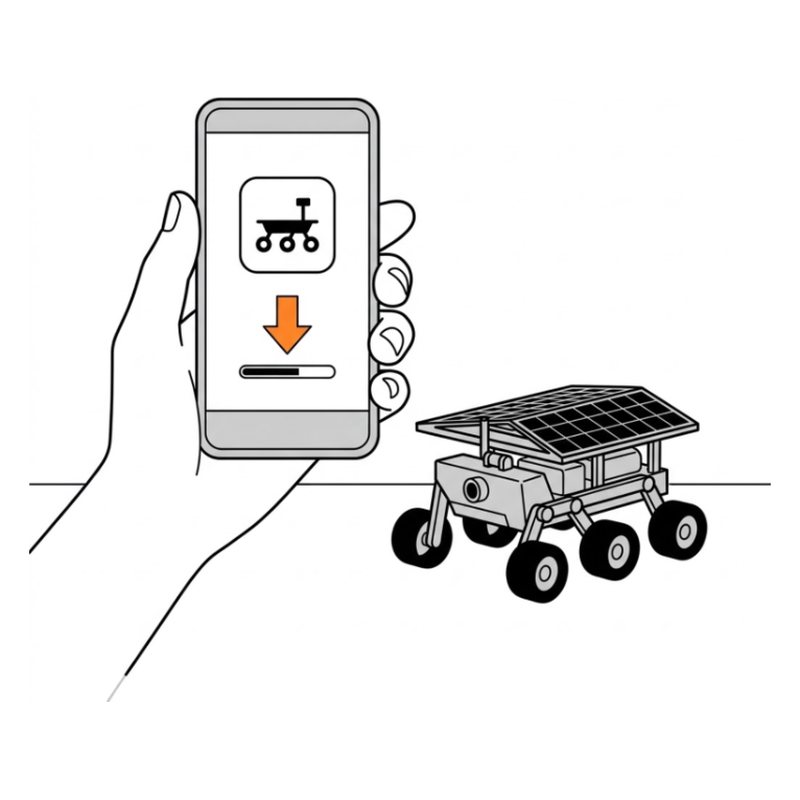
On your phone, install RoboPilot from the App Store or Google Play. Older kits use SunFounder Controller, which works the same way.

Check: The app is installed.

SunFounder GalaxyRVR step 47: Join the rover's Wi-Fi
Step 47 of 49

Join the rover's Wi-Fi

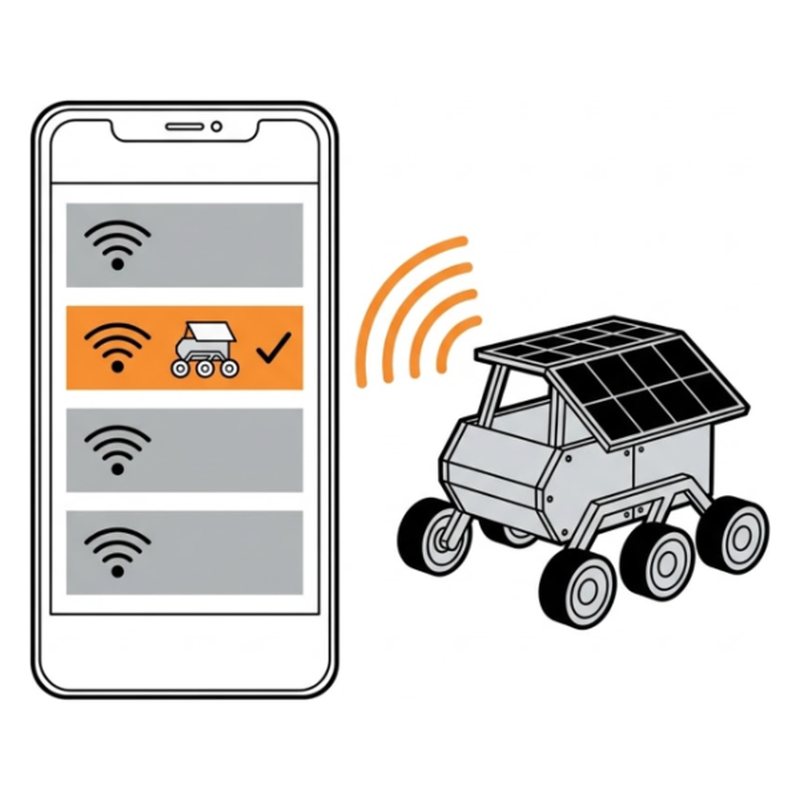
In your Wi-Fi settings join GalaxyRVR. The password is 12345678. When it says No internet, tap Stay connected.

Check: Connected to GalaxyRVR.

Common mistake: Switching back to home Wi-Fi when the phone says No internet. Tap Stay connected.

SunFounder GalaxyRVR step 48: Drive!
Step 48 of 49

Drive!

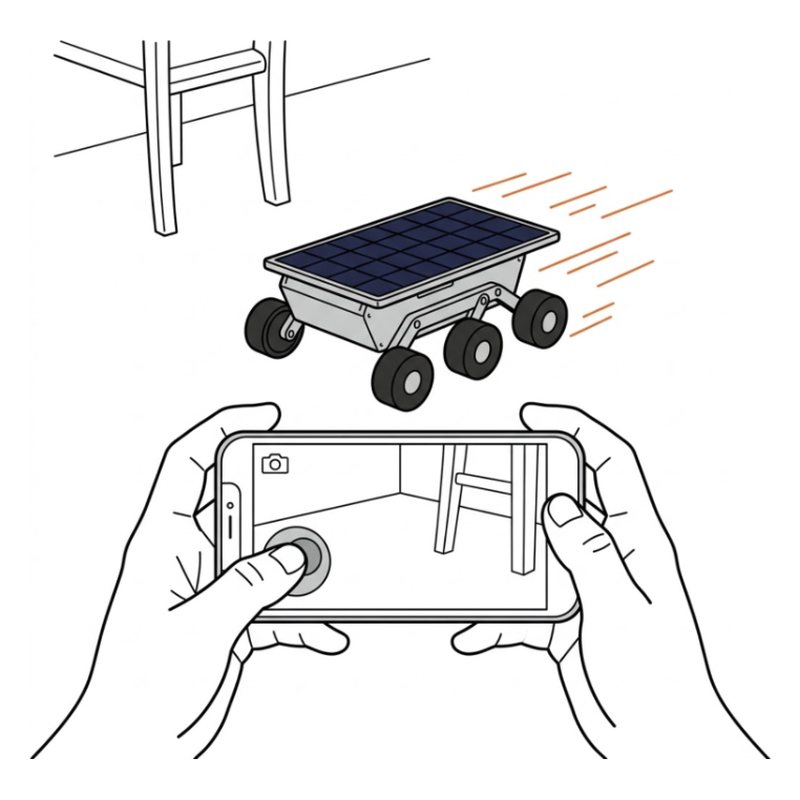
Open the app and tap Go into. The camera view fills the screen. Push the joystick gently.

Tip: Small pushes mean slow. Start slow until you know how it turns.

Check: Live camera view. It drives when you push the joystick.

Common mistake: Pushing the joystick all the way. Start with small pushes.

SunFounder GalaxyRVR step 49: Let it drive itself
Step 49 of 49

Let it drive itself

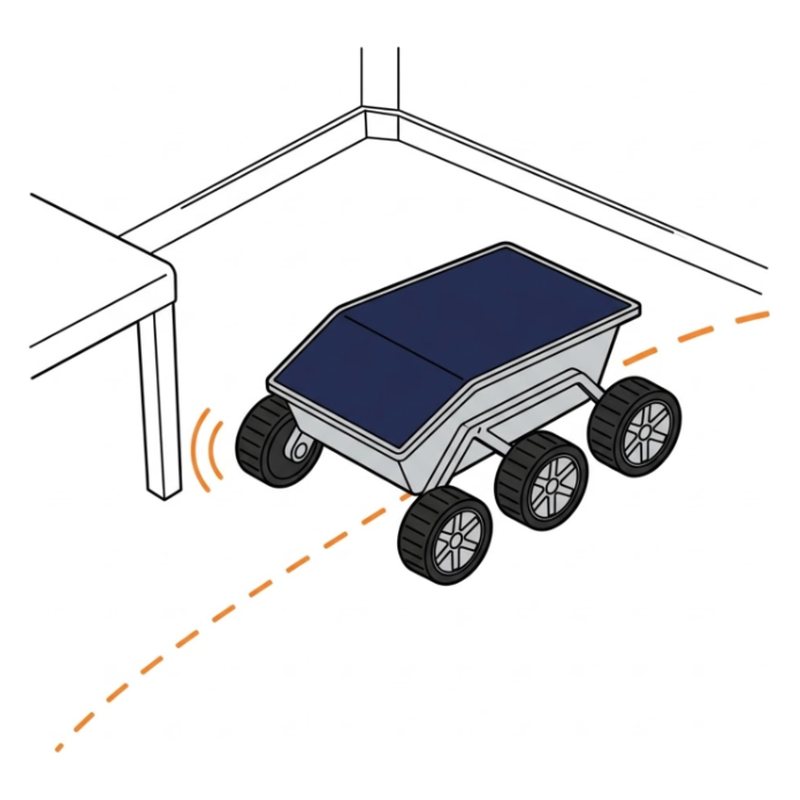
In the app pick Avoid mode, put it on the floor and watch it steer around walls. Then try Follow.

Tip: Bumps into walls? Put a box 20 cm in front of each IR sensor and turn its small screw until its light comes on.

Check: It turns before hitting a wall.

Common mistake: Testing Avoid mode on a dark rug. The IR sensors work best on light, flat floors.

Free build tool

Build it with a check after every step

Same 49 steps on your phone, one at a time. Tick what you should see, and if something looks off, the AI coach checks a photo of your build.

Start building →

After the build

Mars recon

Drive into another room using only the camera view. No peeking.

Obstacle course

Build a track from books and pillows and time your best run.

Solar day

Park it on a sunny windowsill and let the solar panel top up the battery.

See projects you can build next with the same box.

More robot kit guides

Sources

Drawings by robotsforthat. SunFounder GalaxyRVR is a trademark of SunFounder. We are not affiliated with SunFounder.