Skip to content
Live
Updated 2026-10-27

SunFounder GalaxyRVR: the GalaxyRVR Wi-Fi does not show up

Researched by Riley Hart · based on SunFounder GalaxyRVR build guide and docs · we may earn a commission

Short answer

The rover is in upload mode, the battery is flat, or the camera board is not powered. The camera board makes the Wi-Fi. Start with this: Check the battery lights. If both are off, charge it.

Why it happens

The rover is in upload mode, the battery is flat, or the camera board is not powered. The camera board makes the Wi-Fi.

How to fix it

  1. Check the battery lights. If both are off, charge it.
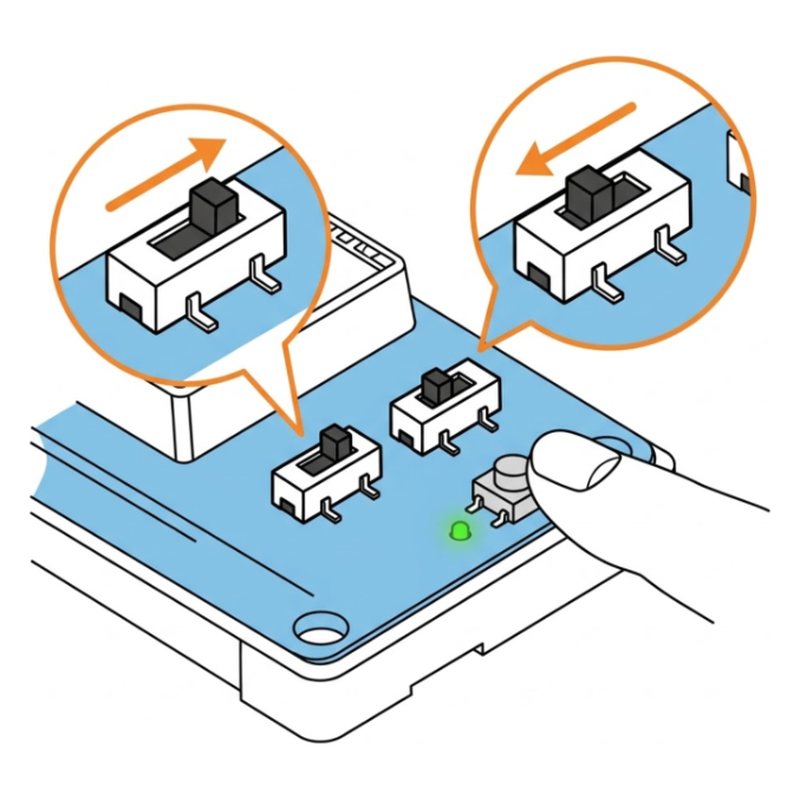
  2. Slide the mode switch to the left (Run), not Upload.
  3. Press Reset on the board and wait 20 seconds.
  4. Check the ESP32 CAM is fully pushed into its adapter. If its small light stays off, it has no power.

Check the step it comes from

SunFounder GalaxyRVR step 45: Switch it on
Step 45 of 49

Switch it on

Unplug the charger. Slide the power switch to ON, slide the mode switch to the left, and press Reset once.

Tip: For driving, the mode switch always stays on the left. Right is only for uploading code.

Check: Green power light on. The light strips flash green.

Common mistake: Mode switch on the right. Right is only for uploading code, left is for driving.

See this step in the full build guide

Still stuck?

Show the AI coach a photo

Open step 45 in the free build tool, tap Stuck and take a photo. The coach checks it against that exact step and tells you what to change. 3 free questions per kit.

Open step 45 →

Other GalaxyRVR problems

All 12 GalaxyRVR problems and fixes · The full build guide

SunFounder GalaxyRVR Mars Rover Kit$129.99 at SunFounder. Every part and tool in one box.
See it at SunFounder store

Sources

Drawings by robotsforthat. SunFounder GalaxyRVR is a trademark of SunFounder. We are not affiliated with SunFounder.